


Productivity is one of the major goals of Visual Basic 2005 and with “My” Microsoft may just have hit a home run.
Although Visual Basic .NET is just as powerful as C# for building business applications, it did not get the initial push that C# did back at PDC 2000 when Microsoft unveiled .NET. This was not meant to slight Visual Basic and Visual Basic developers, but rather represented the state of the Visual Basic .NET language which was not as far along in the development process as C#. Opponents to the Basic syntax took this and ran with it. Microsoft has tried to attack this misconception but has also caused some of the problem, initially by pushing .NET for Web services development so hard that many developers and managers incorrectly got idea that .NET was primarily for Web services. With Visual Basic 2005 the power of the .NET Framework is fully exposed and the true power of Visual Basic is once again starting to take form and that power is productivity. Whereas C# is about language first and foremost Visual Basic is about language and tools to make the development process faster.
My makes retrieving settings and resources that your application requires simply more productive.
One of the language and tool innovations introduced in Visual Basic 2005 is the My namespace. This may seem like an odd name at first, but Microsoft created My to make it easier to execute common code patterns that developers use in .NET applications. Often these common code patterns, such as reading the text in a file, were made more confusing than necessary simply because the plethora of awesome choices that .NET provides. Although it is great to have many possible ways to accomplish a task, these choices may also lead to confusion for the developers new to the .NET Framework. My supplies shortcuts to some common boilerplate code such as invoking Web services referenced by the application, gaining access to information about the user, the computer, the network, etc. Some of the capabilities of My will result in less code and in some cases using My makes getting at information more intuitive. In this article I will show you some common tasks that the My namespace makes easier and I'll show how you can add to and extend My with your own information.
What's in My?
My is a shortcut to several categories of information and functionality. My provides rapid access to the following categories of information:
- My.Computer - Access to information related to the computer such as file system, network, devices, system information, etc. My.Computer provides access to a number of very important resources including My.Computer.Network, My.Computer.FileSystem, and My.Computer.Printers.
- My.Application - Access to information related to the particular application such as name, version, current directory, etc.
- My.User - Access to information related to the current authenticated user.
- My.Resources - Access to resources used by the application residing in resource files in a strongly typed manner.
- My.Settings - Access to configuration settings of the application in a strongly typed manner.
My Makes Code More Intuitive
One of the reasons that Visual Basic is my preferred language for .NET development is that, in my opinion, using English words makes the intent of the code easier to grasp when someone new to the code looks at it for the first time. Software can be expensive to create, but more often then not it costs more to maintain custom software than to create it. I believe using the My namespace will help to make code easier to grasp when a new developer first looks at it. Let's look at a few examples where My cleans up the code. Note that in the remainder of the article I will refer to Visual Basic .NET 2003 as VB7.1 and I will refer to Visual Basic 2005 as VB8.
In a Windows Forms application you often need to know which directory the application is running in so you have access to data files, configuration information, etc. In VB7.1 to find the current directory of an application you could use the following function:
Public Function GetAppDirectory() as String
   Return System.IO.Directory.GetCurrentDirectory
End Function
Now that isn't difficult nor does it represent a great deal of code yet the code wasn't intuitive. In VB8 the code to get the current directory looks like this:
Public Function GetAppDirectory() as String
   Return My.Application.CurrentDirectory
End Function
That's easier to read, isn't it? Let's look at another example. Suppose your application uses role-based security and it needs to check if a user is in a particular role. In VB7.1 to check the role you need to gain access to the current security principal in the current thread. Your code might look like the following:
Public Function UserInRole(ByVal role As String)
As Boolean
   Return
Thread.CurrentPrincipal.IsInRole(role)
End Function
While in VB8 using the My namespace the code might be this simple:
Public Function UserInRole(ByVal role As String)
As Boolean
   Return My.User.IsInRole(role)
End Function
I am writing this article using the Community preview released at Microsoft TechEd 2004 in San Diego. I think that Microsoft could make using My to find the current User of the application more clear, but in my opinion the VB8 version is easier to read than VB7.1. In VB7.1, access to the easiest method to get the current user name is done through the Environment class.
Public Function GetUserName() As String
   Return Environment.UserName
End Function
In VB8, My makes the current user name accessible through My.Computer.
Public Function GetUserName() As String
   Return <a href="http://My.Computer.Info">My.Computer.Info</a>.UserName
End Function
I hope that the UserName property gets moved to My.User.Name in the final release of VB8. Note that My doesn't move the functionality from other libraries in the Base Class Library, My just provides shortcuts and/or helper functions for access to the functionality. Now that you have seen some simple shortcuts, let's look at how My actually reduces code.
Partial classes, a new feature in Visual Basic 2005, allow you to combine multiple files into one class.
.NET 1.0 and .NET 1.1 made using resources relatively easy, but My and VB8 make using these resources much easier. To illustrate this difference, the next code snippet shows how you would set the Text property of four Label controls based on some string resources.
Dim rm As ResourceManager =
ResourceManager.CreateFileBasedResourceManager
("prompts", ".", Nothing)
        Prompt1Label.Text =
rm.GetString("prompt1")
        Prompt2Label.Text =
rm.GetString("prompt2")
        Prompt3Label.Text =
rm.GetString("prompt3")
        Prompt4Label.Text =
rm.GetString("prompt4")
This code snippet demonstrates how you would do the same with VB8 and My.
Prompt1Label.Text = My.Resources.Prompt1
Prompt2Label.Text = My.Resources.Prompt2
Prompt3Label.Text = My.Resources.Prompt3
Prompt4Label.Text = My.Resources.Prompt4
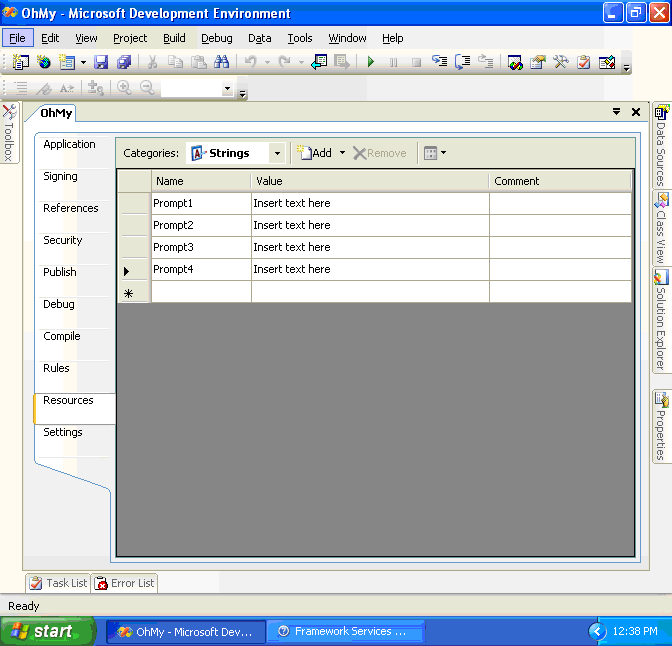
The VB8 examples uses less code and is far less error prone since the resources are now strongly typed, which you'll agree is better than using hard coded strings to indicate which resources you want to retrieve. In addition to providing easier access to the resources, Visual Studio 2005 makes it easier to create the resources with the Resource editor shown in Figure 1.
My Reduces the Amount of Code You Write
OK, so you have seen how My moves some information around to provide more intuitive access. In the next several examples I'll show you how My reduces the amount of code you must write.
Visual Basic 2005 brings application-level events to Windows Forms?a concept that ASP and ASP.NET applications have had for years. In my opinion this concept is even better suited for Windows Forms.
Suppose you need to read in text from a simple text file and you want to load the text into a TextBox. Here is the VB7.1 code:
Imports System.IO
Public Sub LoadText()
     Dim textFileReader As New
     StreamReader(Directory.GetCurrentDirectory &
     "\MyTextFile.Txt")
     TextFileTextBox.Text =
     textFileReader.ReadToEnd
     txtFileReader.Close
End Sub
Now that wasn't too difficult (if you don't count the time it took to find the proper library and functions to call). Now lets look at the VB8 implementation using My.
Public Sub LoadText()
     TextFileTextBox.Text = _
     My.Computer.FileSystem.ReadAllText(
     My.Application.CurrentDirectory _
     & "\MyTextFile.Txt")
End Sub
My saved me a little code in that example. My makes retrieving settings and resources that your application requires simply more productive, and they are also now strongly typed.
You Can Extend My
I build a lot of similar helper functions for my client's applications. It would be cool if I could somehow plug these helper functions or similar functions into the My namespace. My allows that through new functionality provided in the CLR. Through simple namespace manipulation you can add and extend items to My.
My Namespace Allows You to Add Classes to My
Let's look at how to add a completely new object under the My namespace. Suppose you have a global contact list and you want to build a class to provide quick access to your organization's information including office locations, phone numbers, etc. You would want your developers to access the office information with the following code:
For each office as Office in
     My.Organization.Offices
     OfficeList.Items.Add(office.Name)
Next For
So how do you go about doing this? In the Community Tech Preview all you need to do is create a class in your project with a namespace of My such as the following:
Namespace My
   Public Class Organization
      Public Shared ReadOnly Property
      Offices() As Office()
         Get
            Dim workOffice() As Office = _
            My.WebServices.Service.GetOffices()
            Return workOffice
         End Get
      End Property
   End Class
End Namespace
Notice that I used My.WebServices to access the Web service I had referenced in my project. So instead of the following code:
Dim myWebServ As New CompanyInformation.Service
Dim workOffices() As myWebServ.GetOffices
My.Webservices provides a nice little shortcut to all the Web services and also documents what Web services the application is using. I think this makes the code clearer because a developer will see that I am indeed calling a Web service and not just using an object.
Partial Classes Allow You to Add to My.Computer
My.Computer is a special case that allows you to add to the My.Computer object by using partial classes. Partial classes, a new feature in VB8, allow you to combine multiple files into one class. (A deep discussion of partial classes is outside of the scope of this article*.)* Suppose your application is for PCs with integrated phones. You could add the phone to My.Computer with code similar to the following:
Namespace My
    Partial Friend Class MyComputer
        Private _phone As Phone
        Public ReadOnly Property Phone() As Phone
            Get
                If _phone Is Nothing Then
                    _phone = New Phone
                End If
                Return _phone
            End Get
        End Property
    End Class
    Public Class Phone
        Friend Sub New()

        End Sub
        Public Sub Dial(ByVal number As String)
            'Use Telephony API(TAPI) stuff here
        End Sub
        Public Sub Answer()
            'Use Telephony API(TAPI) stuff here
        End Sub
    End Class
End Namespace
My Introduces Application-Level Events for Visual Basic
VB8 brings application-level events to Windows Forms - a concept that ASP and ASP.NET applications have had for years. In my opinion this concept is even better suited for Windows Forms. In a .NET 2.0 Windows Forms application you have access to the four following events:
- Startup?This event fires when the application first starts.
- Shutdown?This event fires when the application shuts down.
- StartupNextInstance?This event fires when a new instance of the application starts.
- UnhandledException?An event that lets you gracefully shut down an application if an exception occurs that is not handled. (This was possible in VB7.1).
You can also use these application-level events from C# if you reference the Microsoft.Visual Basic assembly.
I think that Microsoft could make using My to find the current User of the application more clear.
Let's look at how the UnhandledException event clears up some VB7.1 code. In VB7.1 you could handle an unhandled exception with the following code:
AddHandler
AppDomain.CurrentDomain.UnhandledException,
AddressOf MyHandler

Private Sub MyHandler(ByVal sender As Object,
ByVal args As UnhandledExceptionEventArgs)
   'Do something useful here
End Sub
As you can imagine, VB8 introduces a more intuitive implementation.
Private Sub MyApplication_UnhandledException(
ByVal sender As Object,
ByVal e As Threading.ThreadExceptionEventArgs)
Handles Me.UnhandledException
   'Do something useful here
End Sub
Of course you should do something useful when your code triggers this event.
My Adapts to the Project Type
You will notice, depending on the type of project you are working on, that My will not behave exactly the same because it is project sensitive. For example, in an ASP.NET application My will not provide information that does not make sense in that runtime environment. This holds true for Windows Forms applications, Console applications, etc. See the sidebar, “My Behaves According to the Project Type” for more information.
Summary
Visual Basic 2005 (the tools and the language) puts Visual Basic clearly in the lead when it comes to producing clean, maintainable, robust code in a rapid fashion. My and the new capabilities of the Base Class Libraries that Microsoft build to support My is just an example of this robustness that .NET developers using Visual Basic will come to enjoy.
