


Code Access Security (CAS) is the .NET Common Language Runtime (CLR) mechanism for maintaining security based on the identity of code.
Most developers don't have to work with CAS on a daily basis because the .NET Framework libraries take care of much of the work involved in securing code. However, when you do need to work with CAS, having a good understanding of CAS policy management is essential. Waiting until the eleventh hour in the project lifecycle and realizing that you need to configure security policy is painful. For example, if you have a Smart Client application that runs over Internet Explorer, you will need to consider what permissions your application requires and how you are going to configure policy so that your code will run on a client machine. Or, suppose that your application defined a custom permission for a scenario not already covered by the permissions that ship with .NET. Here again you need to understand CAS policy. This article discusses the essential elements of CAS (evidence, permissions, and policy), shows how .NET CAS policy works, and explains reasons for making various policy decisions.
CAS and the Elements of Policy
CAS security is based on the identity of managed code. The need for CAS arose out of the constant execution and threat of malicious code on the Internet. A quick look at what has been done up to now in the way of security can help set perspective on the value of CAS.
Previous efforts to stem the tide of malicious code were not enough. There was, and still is, role-based security that maintains security based on the identity of the person that is running the code. Role-based security was, and still is, an important element in system protection. But in this day and age it is not enough.
Certificates and sandboxes for ActiveX controls, applets, and script were the first widespread commercial means to apply security measures to code. Initially these efforts simply prevented code from running until the user gave the code permission. However, these security implementations either gave code all permissions or none, thereby preventing it from running; there wasn't a middle ground that gave users a choice. In the case of ActiveX controls, non-technical users had to choose whether or not to let unknown code run on their system, exposing a dangerous situation for someone to make an uninformed mistake and allow malicious code to execute. All-or-nothing and on-demand security have their place but they are not enough.
Internet Explorer improved upon some code security by introducing zones that allowed code to receive a certain amount of trust based on where it was launched from. This good idea is now part of the present CAS strategy. However, CAS takes this idea and goes further.
In CAS, code contains evidence that identifies its origin. The evidence could be a zone, publisher, or one of several other types of evidence. CAS policy evaluates the evidence and resolves/assigns permissions that a piece of code is allowed to have. .NET supports many permission types, giving you a fine level of granularity in choosing what code can do. Additionally, you can configure CAS policy on multiple levels, letting you explicitly plan and specify a policy that keeps your system secure and allows only necessary code to run to let you get your work done.
Evidence
Evidence represents the origin of code. At run time, the .NET Common Language Runtime (CLR) gathers evidence on an assembly that it uses for security as the application executes. Table 1 identifies the type of evidence supplied by .NET by default. Although this article focuses on existing evidence types, you should know that if one of the pre-existing evidence types doesn't meet your needs, you can create your own.
.NET calculates evidence at run time because it cannot resolve the origin of an assembly until that assembly is executing. For example, if you run an application from a directory of the workstation you're working on, it has Site evidence of localhost. If that same application were launched from a Web site, such as C# Station, its Site evidence would be http://www.csharp-station.com. It is the same assembly, but because its origin differs between invocations, its evidence is different.
Permissions
Evidence is the input to CAS policy and permissions are the output. Permissions specify what a piece of code is allowed to do. Code can only perform actions for the permissions it is given?there are no defaults.
Table 2 shows what permissions come with .NET. While this article only focuses on existing permissions, because CAS is configurable, you can build your own permission classes. To help make it easier to apply policy, .NET lets you combine permissions into permission sets.
When you install .NET on your computer, the installation program added the Microsoft .NET Framework 1.1 Configuration tool (Figure 1) to your system to make it easier to work with permissions and configure CAS policy. You will find the Microsoft .NET Framework 1.1 Configuration under Administrative Tools (under the Control Panel). If you have multiple versions of .NET installed on your system, you will have more than one version of this Configuration tool. Be sure to select the one for the version of .NET you need to set policy with.
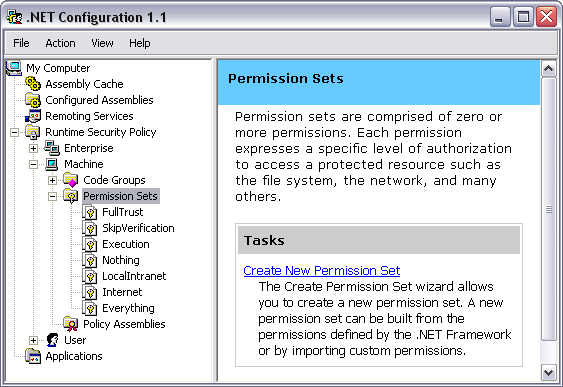
Once you've opened the Microsoft .NET Framework 1.1 Configuration tool, select Runtime Security Policy, choose Machine, and then choose Permission Sets. Each Permission Set contains multiple permissions, making it easier to define policy.
You may have noticed two Permission Sets named FullTrust and Everything. FullTrust gives blanket full trust for all permissions, existing and future, that an application will ever need. The Everything permission set covers all permissions that ship with .NET. The Everything permission set does not include the Skip Verification Security permission, which allows an assembly to bypass CLR verification.
Code Groups
Code groups are at the heart of setting CAS policy. Through a series of logical operations on a hierarchical set of code groups, you control what managed code is allowed to do on your system. Code groups are atomic elements in CAS policy that map evidence to permissions. Figure 2 shows the default code groups that ship with .NET.
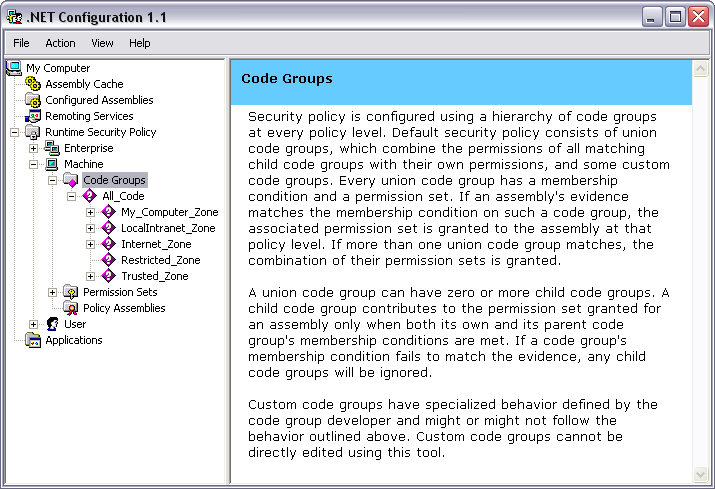
A single code group contains two members: a membership condition and a permission set. The membership condition accepts a type of evidence. If the provided evidence meets the requirements of the membership condition, the permission set associated with that code group will be used in further evaluation of CAS policy.
For example, in the My_Computer_Zone code group, the Evidence type is Zone. The Membership Condition states that the zone must be MyComputer and the Permission Set is FullTrust. If the assembly was launched from a local directory, the Membership Condition will be met and the FullTrust permission will be added to the set of permissions used to resolve CAS policy. However, if an assembly was launched from a different computer on the LAN or from across the Internet, this code group would not contribute to the set of permissions an assembly is granted.
Resolving Permissions
Policy levels are instrumental elements of CAS policy. In both Figure 1 and Figure 2, you'll notice three policy level nodes under Runtime Security Policy: Enterprise, Machine, and User. Another policy level, AppDomain doesn't appear because it is controlled by the developer rather than via configuration. Within each policy level is a set of code groups defining policy at that level. Policy is resolved by evaluating policy for each level, using code groups, and then resolving the final policy, using policy levels.
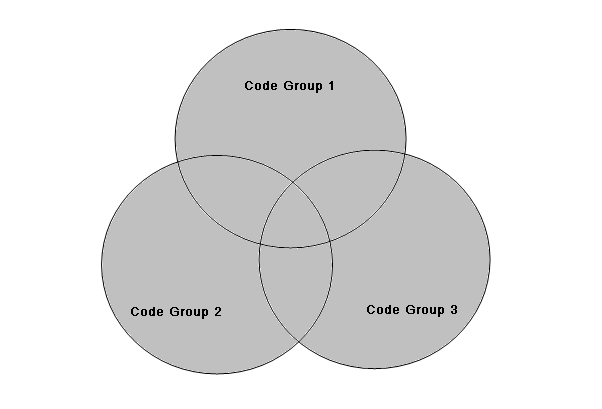
Inside of a policy level is a set of hierarchically organized code groups. Policy resolution begins at the top of the code group hierarchy, checking assembly evidence with the membership condition. If the assembly meets the membership condition of a given code group, it adds that code group's permission set to its set of permissions for that policy level. Additionally, when a membership condition is met, .NET evaluates code groups lower in the hierarchy. CAS policy traverses the entire code group hierarchy, gathering a set of permissions for every membership condition match within that policy level. The grant set of permissions belonging to that policy level is the union of all permissions for which a membership condition was met. This occurs for each policy level. Figure 3 illustrates the permission grant set, colored in gray, of an arbitrary policy level with three code groups whose membership conditions matched evidence on an assembly.
Once .NET computes the grant set for each policy level, the final set of permissions must be resolved. .NET determines the final grant set by calculating the intersection of all the policy levels. In Figure 4, the gray portion shows the intersection of the permission grant sets of the User, Machine, and Enterprise policy levels, which is the final permission set granted to an assembly. Although the AppDomain policy level is not shown in Figure 4, it also intersects with the other three policy levels.
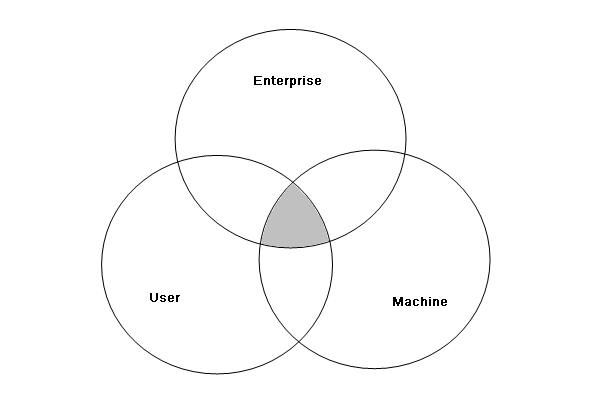
The default CAS policy configuration gives the All_Code code group FullTrust permissions at the User and Enterprise policy levels. This effectively makes the Machine policy level control CAS policy a default configuration. This is important to pay attention to because accidentally applying policy to User or Enterprise can break a policy and would be hard to find and fix, unless that is what you explicitly want to do.
Exclusive and Level Final
While .NET normally resolves CAS policy through code group unions and policy level intersections, there are exceptions to this process that offer more control in setting policy for special circumstances. Two policy attributes, Exclusive and Level Final, are shown as check boxes at the bottom of Figure 5.
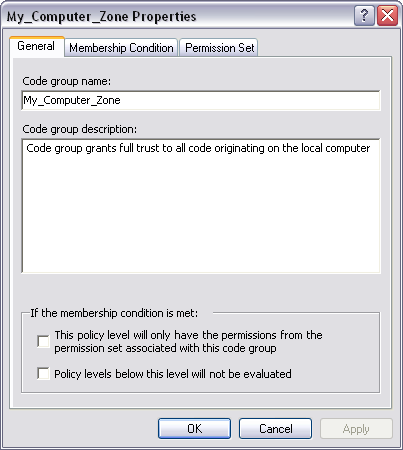
The Exclusive attribute applies when traversing the code group hierarchy within a single policy level. If the membership condition of a code group is matched and that code group is marked as Exclusive, then the permission set for that code group will be the only permission set granted to an assembly at this policy level. Even if the membership conditions of other code groups at the same policy level match assembly evidence, their permissions will not be added to the assembly's permission grant set.
You use the Exclusive attribute to force an assembly to have no more permissions than those specified by a specific permission set. For example, if you wanted to guarantee that a given assembly did not receive any permission, you would create a code group with a membership condition matching some evidence for that assembly and give it the Nothing permission set.
Another policy statement attribute that alters default policy resolution is Level Final. If you place a Level Final on a code group at a given policy level and the assembly has evidence that matches the membership condition of that code group, none of the policy levels below that policy level will be evaluated. The hierarchy of policy levels starts with Enterprise at the top, then goes down to Machine, and finally ends at User.
The practical application of Level Final is to force a given policy on a system, preventing lower level policies from changing the policy in any way. For example, consider the System Administrator who needs to install an application that must run on every workstation in the company. They would set the policy for the assemblies belonging to that application at the Enterprise policy level. This means that settings at the Machine and User policy levels will not interfere in the policy set at the Enterprise policy level for that application's assemblies.
Policy Assemblies
Another branch of the Runtime Security Policy node in the Microsoft .NET Framework 1.1 Configuration tool is the Policy Assemblies. Policy assemblies are those assemblies containing types used to resolve CAS policy.
To understand why you might add an assembly to policy assemblies, consider what happens at runtime when .NET evaluates a policy level. The CLR will load all assemblies that hold permission objects so that it can use them to resolve policy. However, anytime the CLR loads an assembly, it must resolve permissions for that assembly. This opens up a chicken and egg situation where an assembly containing permissions will continue to be loaded recursively. To solve this problem, all assemblies containing permission types are added to the policy assemblies list, giving them FullTrust permissions.
Applying CAS Policy
The previous sections described the mechanics and theory of how CAS policy works. Now, I want to demonstrate a scenario where you would want to apply CAS policy. This example takes a simple smart client application, adds logic requiring permissions beyond those granted in the Intranet Zone, and uses a no-touch deployment model.
To get started, create a Windows Forms application in your IDE. Double-click on the form and add the following code to the Load event handler that is generated:
private void Form1_Load(
object sender, System.EventArgs e)
{
using (System.IO.FileStream stream =
System.IO.File.Open("SomeFile.txt",
System.IO.FileMode.OpenOrCreate))
{
// do file I/O
}
}
After you've compiled the program and verified that it runs without generating an exception, create an IIS virtual directory, referring to the directory where the executable of this program resides.
For the purposes of this discussion, I'll assume that the virtual directory alias is EnvDemo and you've named your sample application WinForm1.exe. You can test the security characteristics of this application in the Intranet Zone by launching Internet Explorer and typing the following address into the address bar and pressing Enter:
http://localhost/EnvDemo/WinForm1.exe
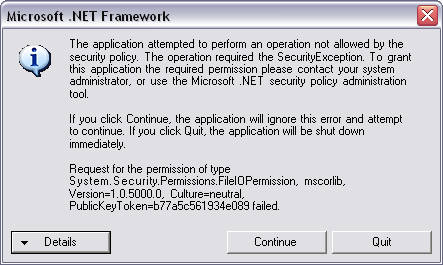
When you run this program for the first time, you may receive a JIT Debug error dialog. If the application had a strong name, you wouldn't see this error. For now, select the no button and launch the application again. This time you will receive a Security Exception dialog that states that the assembly was not granted FileIOPermission, which is what you want to see at this point.
.NET raises the SecurityException exception because the evidence resolved during runtime on this application indicates that it is a member of the Intranet Zone. When CAS policy resolved the security on this assembly, it matched the membership condition of the LocalIntranet_Zone code group, which added the .NET LocalIntranet permission set to the assembly's permission grant set. If you recall, an assembly does not have a permission unless it has been explicitly granted. Since the LocalIntranet permission set does not include FileIOPermission, the CLR detected this and raised the SecurityException exception.
To fix this, you need to modify security policy to give this assembly FileIOPermission. In the Microsoft .NET Framework 1.1 Configuration tool, select the All_Code Code Group under Machine Policy Level. Right-click and select New from the context menu, bringing up the Create Code Group dialog box shown in Figure 6. Perform the following steps to create CAS policy for this assembly:
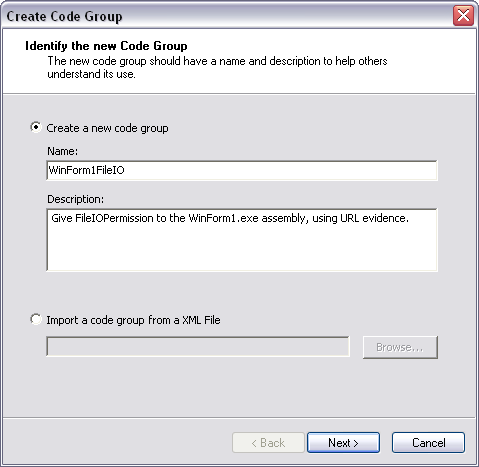
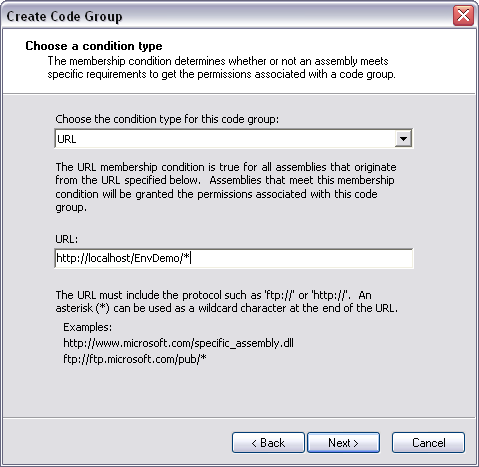
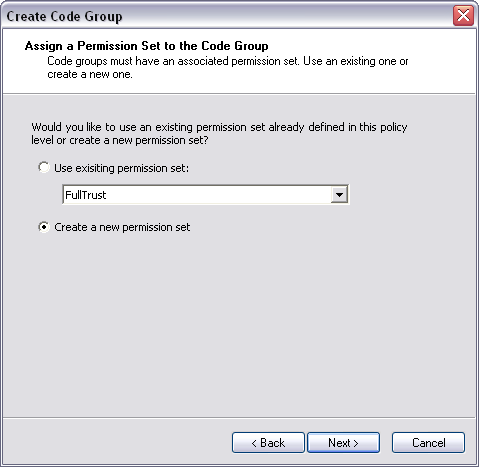
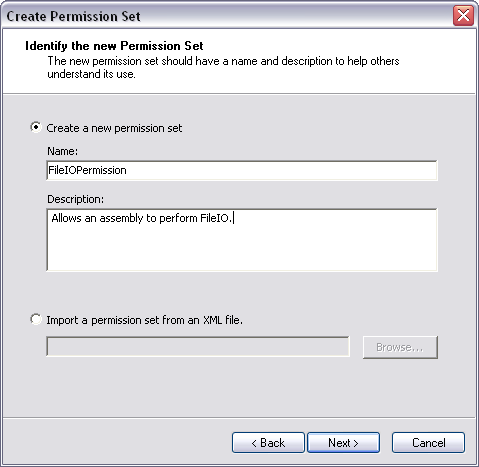
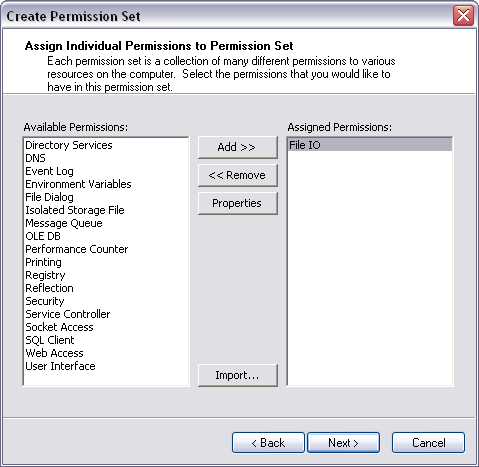
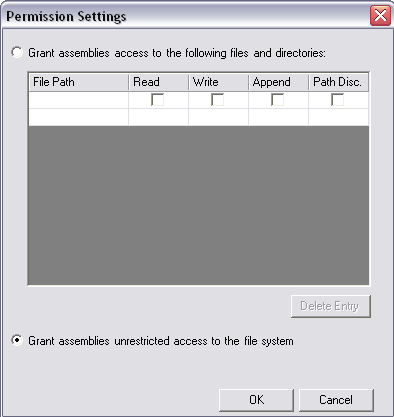
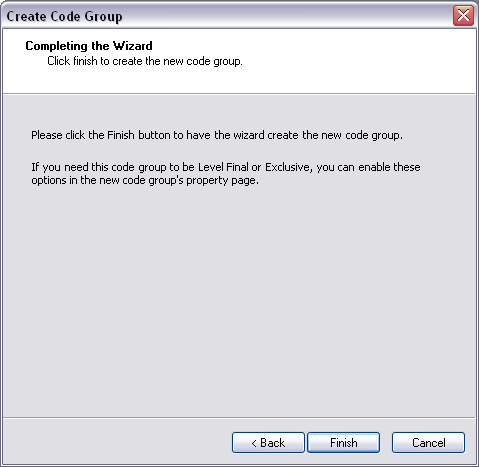
If you look at the code groups for the Machine policy level, you'll see a new code group named WinForm1FileIO. Similarly, the permission sets in the Machine policy level will contain a new permission set named FileIOPermission.
Now run the application from Internet Explorer as before. If you have set up CAS policy properly, the application will run without generating a security exception.
Additional Utilities
Selecting the Runtime Security Policy node in the Microsoft .NET Framework 1.1 Configuration tool shows several utilities in the work area, shown in Figure 14. The Increase Assembly Trust and Adjust Zone Security wizards are quick ways to grant or restrict permissions to code. They are not fine grained solutions demonstrated in my previous walkthrough. Using one of these wizards means that you could end up granting an assembly more permissions than it needs. Additionally, using one of these wizards changes default security policy. You could accidentally modify security policy on all machines. In contrast, setting a specific code group that targets an assembly is simple and leaves the existing policy settings in place. You'll have to consider these tradeoffs among others as you establish security policy.
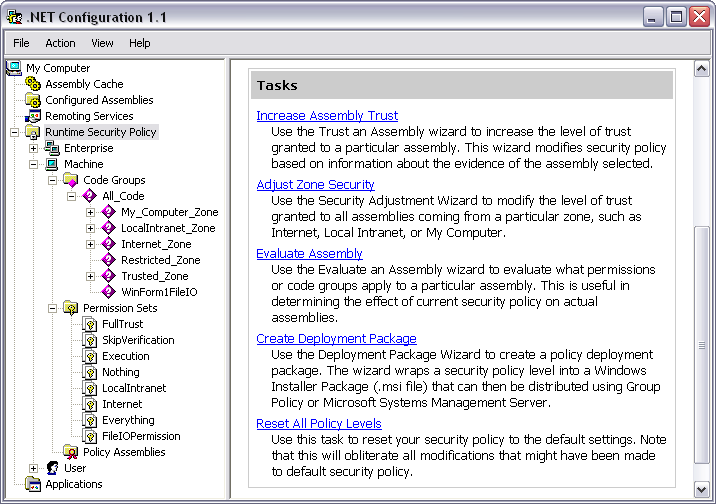
Other utilities in run time security policy include Evaluate Assembly, Create Deployment Package, and Reset All Policy Levels. I have mixed feelings about the value of Evaluate Assembly. Since .NET determines final security at run time, the information you retrieve from this tool about security requirements doesn't provide the full story. The only way to view the evidence of an assembly is to run code that examines evidence during run time.
The Create Deployment Package utility lets you set policy within an enterprise when you have full control of all machines. However, deploying your solution to customers, where you don't have full control, requires consideration because you can't just overwrite their policy with what you think it should be. Instead, you should consider using an MSI that runs code you've developed to merge and uninstall your policy.
Before you establish CAS policy, you should have some type of configuration management procedure in place that specifies what the policy should be. A good configuration management process will help you recover if you ever run the Reset All Policy Levels utility, wiping out all the work you've done.
Conclusion
Code Access Security (CAS) allows you to secure your system based on the identity of code. Evidence defines the origin of code, and permissions specify what code is allowed to do. The process that maps evidence to permissions is specified by CAS policy, which uses code groups and policy levels to resolve the set of permissions granted to an assembly.
The Microsoft .NET Framework 1.1 Configuration tool is a graphical user interface for working with CAS policy. It contains wizards for creating code groups and permissions. Additionally, it offers utilities that help you implement CAS on your system. Overall, CAS provides you with a powerful set of capabilities for maintaining security in the managed environment.
Table 1: Evidence types that ship with .NET.
| Evidence Type | Description |
|---|---|
| Application Directory | Location where the application resides. |
| Hash | Assembly hash using crypto algorithms such as MD5 or SHA1. |
| Permission Request | Identifies what permissions an assembly must have. |
| Publisher | Authenticode signature of the publisher. |
| Site | Web site the code was launched from. |
| Strong Name | Assembly strong name. |
| URL | URL where code was launched from. |
| Zone | Zone code was launched from. |
Table 2: .NET permissions and protected resources.
| Permission Type | Protects |
|---|---|
| AspNetHostingPermission | ASP.NET hosted environment |
| DirectoryServicesPermission | Active Directory |
| DnsPermission | DNS |
| EnvironmentPermission | Environment variables |
| EventLogPermission | Windows EventLog |
| FileDialogPermission | Open and save common dialogs |
| FileIOPermission | Reading and writing to files |
| IsolatedStorageFilePermission | Isolated storage |
| MessageQueuePermission | MSMQ |
| OdbcPermission | ODBC data sources |
| OleDbPermission | OLE DB data sources |
| OraclePermission | Oracle |
| PerformanceCounterPermission | Performance counters in the Windows Performance Monitor |
| PrintingPermission | Printer |
| ReflectionPermission | Reflecting on types |
| RegistryPermission | Windows registry |
| SecurityPermission | Working with permissions, security, and unmanaged code |
| ServiceControllerPermission | Access to Windows services |
| SocketPermission | Socket IO |
| SqlClientPermission | SQL Server |
| UIPermission | User interface drawing |
| WebPermission | Access Web pages |
