


Microsoft Visual FoxPro 9 is here and it brings lots of new features.
This entire issue of CoDe is dedicated to Visual FoxPro 9, providing details and scenarios on how you can use the new features and enhancements. In this article, I will discuss some of the new controls, events, and commands, and a little more.
The AppStates property indicates whether the application has focus (value 1), or not (value 0).
I'm sure you are as anxious as I am to explore new properties, events, and methods, new or improved commands, and FoxPro Foundation Classes (FFCs). Let's dive right in!
Anchoring Controls
Before Visual FoxPro 8, many lines of code had to be written in order to properly resize onscreen controls whenever a form was resized. In Visual FoxPro 8, that task got slightly easier with the introduction of the BindEvent function. In Visual FoxPro 9, it gets way easier with the introduction of anchoring. Anchors allow a control to maintain its proportional relationship with other objects and controls within a form, no matter what size the form becomes.
The Anchor property is obeyed when the control sits on containers such as Forms, CommandGroups, and Page objects. Whenever those containers get resized, the controls within it that have the Anchor property set are resized and/or repositioned depending on the settings used. Make sure to check out the Anchor Property topic on the Help file for available settings.
Docking Forms
Docking allows toolbars and other controls to be “attached” to any user-chosen edge of a Form and maintain that positioning despite resizing or scrolling. Visual FoxPro 8 introduced the ability to dock objects, such as the Command, Document View, and Properties windows, as well commands and functions that handled docking programmatically.
Visual FoxPro 9 goes a step further and introduces the docking capability to user-defined forms as well. That enables creating dockable Forms on the IDE or on the application delivered to the users.
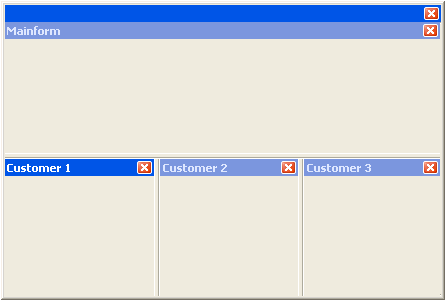
In order to support this feature, new members were added to the Form class, such as the Dockable and Docked properties, the Dock and GetDockState methods, and the AfterDock, BeforeDock, and UnDock events. Listing 1 shows a simple example that produces the result showed on Figure 1.
Collection Object Support in ComboBox and ListBox Controls
The RowSourceType property on ComboBox and ListBox objects has a new option added to the list of possible sources: value 10, for the Collection object.
A Collection could be populated with Business objects or objects holding some sort of data, and that Collection can be used to populate ComboBoxes and ListBoxes. The following code snippet shows an example of that, using a collection named colEmployees contained in the form, and the ComboBox's RowSourceType property is set to 10.
Select EmployeeId, FirstName;
  from employees into cursor curTemp

  Scan
   Local loEmployee as Object
   Scatter NAME loEmployee Blank
   Scatter NAME loEmployee additive

   This.colEmployees.Add(loEmployee,;
          Transform(loEmployee.EmployeeId))
  EndScan

  This.cboEmployees.RowSource =;
    "Thisform.colEmployees, FirstName, EmployeeId"
Rotating Label, Line, and Shape Controls
For long time now, Visual FoxPro developers have been waiting for the ability to rotate labels. The option is now available through a new Rotation property, which receives a number indicating the degrees the control will rotate. The Rotation property is also available for Line and Shape controls.
ListBoxControls Can Hide ScrollBars
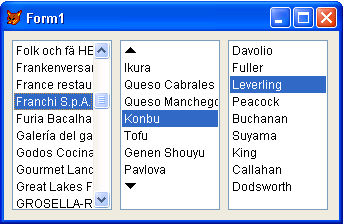
A new AutoHideScrollbar property was added to the ListBox class. This property determines whether or not the ScrollBar is shown on the ListBox, and whether it is shown if the control only has a few entries.
The new Report Engine in Visual FoxPro can leverage the power of GDI+, so if you're planning on doing powerful work with reports, take a serious look at the GDI+ FFC classes.
If the default value 0 is used, the scrollbar is always visible. Value 1 determines that the scrollbar is only visible when the ListBox is full. This makes a lot of sense, as a scrollbar is of no use when all the items on the ListBox fit in a single pane. Value 2 determines that the scrollbar is never visible. If there are more items on the ListBox than what can be viewed in a single pane, up and down arrows appear on the control. Figure 2 shows a snapshot of a form with ListBoxes using the three available settings.
NewObject() Creates Objects without Raising Initialization Code
The NewObject function now accepts 0 as the third parameter in order to create the object without raising code in the Init method. That's useful when the interface of an object must be analyzed (using the AMember function, for example), where neither the code on the Init or Destroy methods should run.
When the following code snippet runs, you'll notice that the Customer table doesn't open by the Init method:
loCustomer = NewObject("CustomerBizObj",;
                 "NewObjectSample.prg", 0)
AMembers(laMembers, loCustomer, 1)
Display Memory like laMembers

Define Class CustomerBizObj As Session
  CustomerID = ""
  CustomerName = ""

  Procedure Init
    Use Home(1)+"\samples\northwind\Customers"
  EndProc

  Procedure GetCustomersByPk(lcPK As String)
  EndProc
EndDefine
Set Path Command Enhancements
An Additive clause was added to the Set Path command. When that clause is used, the path being specified is added to the path setting, if it isn't there already. Besides that, the Set Path command's maximum character limit has been increased to 4095 characters.
AppState Property Detects an Application Losing or Receiving Focus
The _Screen object has a new property called AppState. This property is only available read-only at runtime, and it indicates whether the Visual FoxPro application has focus (value 1), or not (value 0). The value changes automatically whenever the application loses or receives focus, such as when the user uses Alt+Tab. A Timer object, or event handler (using the BindEvent function) can be used to query this property and execute code whenever its value changes.
Specify Where Focus is Assigned in the Valid Event
It's always been a pain when something happens inside a Valid event and you want the focus to go to another control, as calling SetFocus from within a Valid event is not allowed. That's been solved in Visual FoxPro 9 by allowing you to return the execution to a specified object from within the Valid event:
Return Thisform.txtCity
ICASE() Function
The IIF() (immediate if) function has always been a very useful function, but the more complex the expressions, the harder it is to read the code, as multiple IIF calls are needed. The ICASE (immediate case) function solves that problem. The following code snippet shows an example written using both the IIF and the ICASE functions:
Local lcAnswer
lcAnswer = "YES"

? Iif(lcAnswer = "YES", "answered 'yes'",;
  Iif(lcAnswer = "NO", "answered 'no'",;
     'unanswered'))

? ICASE(lcAnswer = "YES", "answered 'yes'",;
        lcAnswer = "NO", "answered 'no'",;
        "unanswered")
TTOC() Converts DateTime Expressions to XML DateTime Format
Visual FoxPro 9 joins the ranks of great software XML adopters. The TTOC function has been improved and receives a value 3 as the second parameter, indicating that the resulting string must be formatted as an XML DataTime format.
? Ttoc(Datetime(),3)
The settings Set Century, Set Hours, or Set Seconds don't affect the result of the TTOC function when the parameter 3 is passed.
Log Execution Plan's Output from SYS(3054) Using SYS(3092)
The SYS(3054) function is very helpful for optimizing SQL queries, as it produces an execution plan of which indexes, if any, are in use, and enabling optimization of queries by creating new indexes or fine-tuning the way the queries are written. The new SYS(3092) function provides the ability to write the output of SYS(3054) directly to a file on disk.
*-- Turn on execution plan.
Sys(3054, 12)

*-- Set up output file.
Sys(3092, "c:\ExecutionPlan.txt", .T.)

*-- Run Query.
Select * ;
from Home(1)+"\samples\northwind\Customers" ;
into cursor curCustomers

*-- Turn off output and close file.
Sys(3092, "")

*-- Let's see the log.
Modify File "c:\ExecutionPlan.txt"
Extended SQL Capabilities
There are many improvements to the SQL subset in Visual FoxPro 9. With each new release, the VFP team moves Visual FoxPro's SQL closer to T-SQL (SQL Server's SQL implementation).
Some of the most notable improvements are:
- The limit of nine join clauses and sub-queries was removed from the SQL Select statement, as were the nine Union clauses limit, the 30 tables limit, and the referenced aliases limit.
- The level of nesting for sub-queries in a SQL Select statement, formerly limited to only one level, is now unlimited.
- The list of fields and the FROM clause can now have a sub-query. This works for the ON clause on joins as well.
- The Like clause is now optimized.
Make sure to read the Data Features Enhancements section under the What's New in Visual FoxPro on the Help file for more specific information about all the improvements on these subjects.
Set Coverage Command Available at Run Time
The Set Coverage command is now available at run time. Anywhere inside an application, the Set Coverage command can be called like this:
SET COVERAGE TO C:\MyApp.log
The Set Coverage command creates a log file for the code being executed. The Coverage Profiler tool (available on the Visual FoxPro IDE under the Tools menu) can then be used to analyze this log file. The Coverage Profiler tool shows the code's coverage, indicating which lines are being executed, and which ones never get executed; it also shows statistics, such as how many times a line is executed, and how long that takes, helping you find code bottlenecks.
The SQLExec function makes it possible to get cursor and count records affected by the SQL Pass-Through command
This new ability of enabling coverage during runtime is also useful for debugging errors that occur during runtime, but that never happen in interactive mode (through the Visual FoxPro IDE).
Populate an Array with Aliases Used by a Specified Table
The AUsed function improved to allow passing a third parameter, one that indicates that the array created by this function should only look for aliases of a specific table. The following code snippet shows a simple example:
Select * ;
from Home(1)+"\samples\northwind\Customers" ;
into cursor curCustomers

Select * ;
from Home(1)+"\samples\northwind\employees" ;
into cursor curEmployees

? AUSED(gaInuse, Set("Datasession"), "Employees")

DISPLAY MEMORY LIKE gaInuse
In the sample above, an array shows the aliases and work area numbers for the Employees table available at the current data session.
SQLIdleDisconnect() Temporarily Disconnects SQL Pass-Through Connections
The new SQLIdleDisconnect function is a great new addition to the SQL Pass-Through set of functions. This function temporarily disconnects a connection handle passed to it (or it disconnects all connections, if a 0 is passed).
That's a great feature for disconnected scenarios, where an application doesn't have to hold a connection to the database even when the user is reading retrieved data, rather than sending data back and forth regularly. Plus, when the connection must be enabled again in order to process something, it happens automatically, using the original connection string.
Retrieving Active SQL Connection Statement Handles
The new ASQLHandles function creates an array with the handles for all active SQL connections. Those handles can then be used with other functions such as SQLExec and SQLDisconnect.
lnConn1 = SQLStringConnect(;
    "driver=sql server;server=(local); "+;
    "database=northwind;")

lnConn2 = SQLStringConnect(;
    "driver=sql server;server=(local); "+;
    "database=pubs;")

ASQLHandles(laHandles)

Display Memory like laHandles
Get Cursor and Count Records Affected by SQL Pass-Through Execution
The SQLExec function has been improved in order to make it possible to immediately get cursor and count records affected by the SQL Pass-Through command. A parameter is passed determining the name of the created array with a list of aliases and a record count produced by the SQL commands.
This code snippet demonstrates this enhancement, producing multiple result-sets:
lnConn = SQLStringConnect("driver=sql server;"+;
         "server=(local);database=northwind;")

SQLExec(lnConn, ;
   "Select * from Customers; "+;
   "Select * from Employees", "", aCount)

Display Memory like aCount
View Classes Inside a Program File (.prg) with the Class Browser
The Class Browser now has the ability to manage program-based (PRG) classes. In previous versions, only Visual Class Library-based (VCX) classes could be viewed. For developers who write several PRG-based classes (like me!), this is definitely a very-welcome feature.
GDI+ FFC classes
Visual FoxPro 9 has a new FFC (FoxPro Foundation Class) library for the Graphics Device Interface (GDI) called _GDIPlus.vcx. This library has many classes working as wrappers around the GDI+ API.
By using GDI+, you can manipulate graphics and images, so this is a really powerful feature. Entire articles could be devoted to this topic, exploring the different classes, how to use them, and when to use them, but it's beyond the scope of this article. I'll just mention these classes here so that you don't overlook this new feature when you are all excited by the other new features.
One simple example of image manipulation is a small program that takes an existent bitmap file on disk, and creates a new JPEG out of the original one, as shown in the following code snippet implementation:
*-- Create an Image object.
Local oLogoImage As GpImage ;
     Of Home(1)+"ffc/_gdiplus.vcx"
oLogoImage = ;
   Newobject('GpImage',Home(1)+'ffc/_gdiplus.vcx')

*-- Load an image file in memory.
oLogoImage.CreateFromFile("c:\Fox.bmp")

*-- Save the image to a JPG file on disk.
oLogoImage.SaveToFile("c:\Fox.jpg",;
    oLogoImage.GetEncoderCLSID("image/jpeg"))
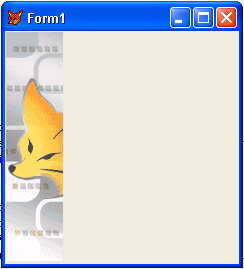
Another example is the ability to manipulate images and draw them on a device such as a form. Listing 2 shows off an implementation of it, and Figure 3 show the result. Notice that the image shown on the form was really drawn right into it, instead of having been added using the Visual FoxPro Image object.
The important thing to notice is that before being drawn, the image can be manipulated, perhaps adding a logo or watermark to it, or text can be drawn over it. It's also worth mentioning that the new Report engine in Visual FoxPro can leverage the power of GDI+, so if you're planning on doing powerful stuff with reports, take a serious look at the GDI+ FFC classes.
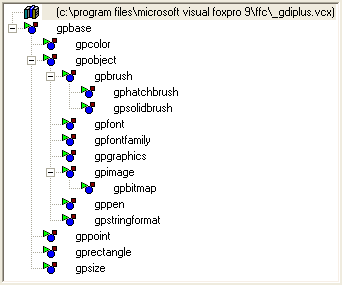
These classes (shown in Figure 4) map to the classes available on the .NET Framework. I strongly suggest that you read some articles about GDI+ with .NET Framework published in previous editions of CoDe Magazine, so that you can understand what sorts of things can be done with this technology, and then you should be able to translate most of the .NET code into Visual FoxPro using the FFC classes.
Conclusion
There are many improvements and new features in Visual FoxPro 9 that are both productivity tools and exciting new ways of building interesting and useful applications. I've only briefly covered some of the developments you'll find when you start playing with this new version. Make sure you take a close look into the “What's New in Visual FoxPro” section on the Help file, and have fun!
Claudio Lassala
Listing 1: Docking User-Defined Windows
Local loMainForm as Form
Local loCustomerForm1 as Form
Local loCustomerForm2 as Form
Local loCustomerForm3 as Form

loMainForm = CreateObject("MainForm")
loCustomerForm1 = CreateObject("CustomerForm")
loCustomerForm2 = CreateObject("CustomerForm")
loCustomerForm3 = CreateObject("CustomerForm")

loCustomerForm1.Caption = "Customer 1"
loCustomerForm2.Caption = "Customer 2"
loCustomerForm3.Caption = "Customer 3"

loCustomerForm1.Dock(3, loMainForm)
loCustomerForm2.Dock(2, loCustomerForm1)
loCustomerForm3.Dock(2, loCustomerForm2)

loMainForm.Show()

Read Events

Define CLASS CustomerForm as Form

   *-- The value of one indicates this form
   *-- "Supports dock and is dockable"
   Dockable = 1

EndDefine

Define CLASS MainForm as Form

   Dockable = 1

   Procedure Destroy()
      Clear Events
   EndProc

EndDefine
Listing 2: Image on a Form drawn using GDI+.
Public oForm As Form
oForm = Createobject("MyFoxForm")
oForm.Show()

Define Class MyFoxForm As Form

  DoCreate = .T.
  Name = "Form1"

  Procedure Paint
    *-- Create Graphics object.
    Local oGr As GpGraphics Of Home(1)+"ffc/_gdiplus.vcx"
    oGr = Newobject('GpGraphics',Home(1)+'ffc/_gdiplus.vcx')

    *-- Get the Form's (Window's) handle.
    oGr.CreateFromHWND(Thisform.HWnd)

    *-- Create an Image object.
    Local oLogoImage As GpImage Of Home(1)+"ffc/_gdiplus.vcx"
    oLogoImage = Newobject('GpImage',Home(1)+'ffc/_gdiplus.vcx')

    *-- Load a bitmap file in memory.
    oLogoImage.CreateFromFile("c:\Fox.bmp")

   *-- Draw Image object on Graphic's surface (here, the Form).
    oGr.DrawImageAt(oLogoImage,0,0)
  EndProc
EndDefine
