


Google now offers the functionality of its search engine through a Web service.
Over the past couple years, Google has become the most popular search engine used on the Web. Building upon its popularity, Google has developed additional search accessories and interfaces for both personal and commercial use. The most powerful interface offered by Google is exposure of its database and search capabilities through the use of a Web service.
If you're not already familiar with Google, it is located at http://www.google.com/ and is commonly known for its creative display logos. According to the Neilson NetRatings of January 2003, Google is rated as the top search engine on the Web with a 29.5% share of the market followed by Yahoo and MSN. In addition to an extremely robust standard search service, Google offers searches in various categories including images, groups, directory, and news. Figure 1 shows the Google home page.
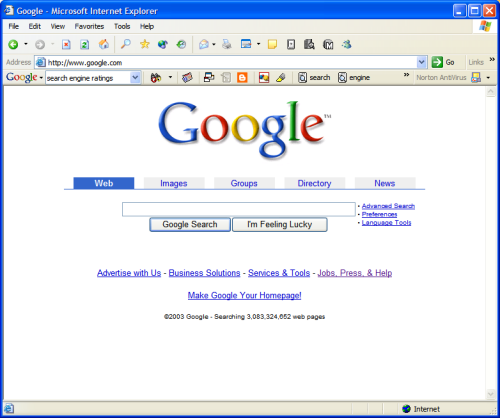
One extremely popular accessory that Google developed to extend its search capabilities is the Google toolbar (Figure 2). The Google toolbar is designed to work with Microsoft Internet Explorer 5 or higher and makes most of the Google functionality available directly in the browser regardless of the current page being displayed. The Google toolbar also includes a built in popup killer. For more information on the Google Toolbar and other accessories, visit http://www.google.com/options/.

Web Services
Traditionally, applications were processed over the Web via HTML pages that users interacted with. A Web service is an application that does not have a visual interface for users to interact with. Instead, Web services are designed for other applications to interact with programmatically. A Web service is a component that interfaces with other applications, devices, and clients through standardized, non-proprietary, and uniform protocols.
Using the beta version of the Google Web service API, the service will return only 10 results per search processed although the estimated total number of results may be greater than 10.
A Web service resides on a Web server and, as such, you can code a Web service using many different technologies including all of the .NET compliant languages as well as Java. At a high level, the protocols and technologies utilized by a Web service include the Web Services Description Language (WSDL), Web Services Discovery documents (DISCO), Universal Description, Discovery, and Integration (UDDI), and Simple Object Access Protocol (SOAP). These technologies are all created using standardized XML grammars.
- WSDL documents describe a Web service, the methods available to be called, and the protocols that the Web service supports.
- DISCO documents describe where the Web service is located.
- UDDI is the online catalog of Web services that are available for use and consumption.
- SOAP is the protocol that is used to pass data back and forth between applications and Web services.
You'll find the UDDI directory located at http://www.uddi.org/. The Wide Web Consortium (W3C) (located at http://www.w3.org) governs the remainder of the technologies listed above.
Google Web Service API
Currently the Google Web service application programming interface (API) is in its beta testing period, hence support for using the API is limited. However, Google has fully documented the Google Web service API online at http://www.google.com/apis/index.html. You can also get minimal technical support via email at api-support@google.com. You'll find answers to many questions in the discussion group at google.public.web-apis.
Beta Terms and Limitations
Let me make you aware of a few additional notes regarding the use of the Google Web service API due to it being in beta. The service will return only 10 results per search processed although the estimated total number of results may be greater than 10. Also, with a developer license you can only make a maximum of 1,000 searches per day. Google is also adamant that you can only use the Web service API for personal use.
Obtaining a License Key
The best part of using the Google Web service API is that it is free to use in accordance with the terms and limitations listed in the section titled Terms and Limitations. You'll find it extremely simple and quick to obtain a license key. The license key issued by Google must accompany all searches processed.
With a developer license you can only make a maximum of 1,000 searches per day. You must obtain a developer license key from Google prior to using their Web service.
To obtain a license key, register with Google to create a new account in step 2 at http://www.google.com/apis/index.html. Once you've created a new account, Google will e-mail the license key to the email address entered.
Referencing the Web Service
Once you have your license key, you need to configure your application to consume the Google Web service. In Visual Studio .NET you add a Web Reference to the WSDL document. Remember that your WSDL document describes how to interact with the Web service and what functionality the Web service exposes.
To consume the Google Web service, start Visual Studio .NET and open the project where you want to use the Google Web service. Right-click on the project in the Solution Explorer and select Add Web Reference.
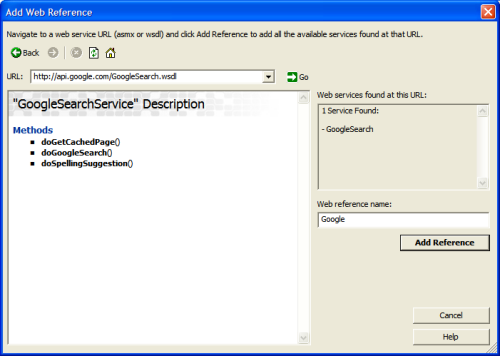
When the Add Web Reference dialog box appears, enter http://api.google.com/GoogleSearch.wsdl in the URL dropdown and click Go. If your application cannot locate the Web service, verify that the Google Web service API is online. Also verify that you have adequate access to the Web from your development machine. Figure 3 shows the Add Web Reference dialog box with the Google Web service located online. Once your application has located the Web service, enter an optional name for the Web service and click Add Reference. A folder named Web References should appear in the project folder structure with the newly added Google Web service listed inside of it.
Calling the Web Service
Once you've added a Web Reference for the Google Web service, the functionality exposed by the Web service should be available to your code. The Web service will be referenced by prefixing it with the root namespace name for the project that the Web Reference was added to. The Google Web service exposes three methods: doGetCachedPage, doSpellingSuggestion, and doGoogleSearch.
The URL to use when creating a Web Reference to the Google Web service API is http://api.google.com/GoogleSearch.wsdl.
Use the doGetCachedPage method to submit a URL to the Google Web service and receive the contents of the URL that the Google database has cached. The Google search engine crawls the Web gathering new content and pages and indexes them in the Google database. When the search engine encounters a URL, it takes a snapshot of the contents of the URL and stores the snapshot in the database. Thus, the contents returned by the doGetCachedPage method will only be as recent as the last time that the Google search engine encountered the URL requested. An identifying key and the URL are passed to the method as strings and the resulting content is returned as System.Byte Base64 encoded text.
You'll use the doSpellingSuggestion method to create the same signature functionality found on the Google home search page. When you perform a search, Google lists a possible spelling correction suggestion i at the top of the page so that if a user misspells a key search term, the search engine will offer the correct spelling of the term. The doSpellingSuggestion accepts a word or phrase containing up to 10 individual words and 2048 bytes and it returns a text string with the suggested spelling term.
The doGoogleSearch method is the heart and soul of the Google Web service API. It performs the actual search functionality based on supplied search criteria. Table 1 lists the possible arguments that you can pass to the doGoogleSearch method. The key argument is the license key that Google issued. You must include it in any search requests made to the Google Web service. The q argument is the term that you want Google to search.
In my example project for this article I've incorporated the Google Web service into an ASP.NET page and my application consumes the Google Web service directly in the code behind page. To call the Google Web service, my application first creates an instance of the GoogleSearchService object as shown in this code snippet:
// Declare a new instance of the Google Search
// Service object.
Google.GoogleSearchService googleSearchService =
   new Google.GoogleSearchService();
This code creates an instance of the GoogleSearchService using an identifier called googleSearchService. Next the application submits a search to the Web service by calling the doGoogleSearch, it pass the appropriate arguments, and then stores the results into a new instance of the GoogleSearchResult object. The snippet below illustrates the call to the doGoogleSearch function member.
// Declare a new instance of the Google Search
// Result object to hold the results of the query.
Google.GoogleSearchResult googleSearchResult =
 googleSearchService.doGoogleSearch(_
"Oy5qm/bQFHJjWHJQjmyhFhLUidsqssF8", _
txtSearchCriteria.Text.ToString(),
startRange,_
numberResults,_
false,"",true,"","","");
In this code snippet, I create a new instance of the GoogleSearchResult object using an identifier of googleSearchResult. GoogleSearchResult will hold a collection of search results returned by the GoogleSearchService.doGoogleSearch function member. The snippet above also illustrates the call made to the doGoogleSearch function member with the appropriate arguments. You can see the license key as the first argument. My application pulls the query terms from a textbox named txtSearchCriteria on the ASP.NET page. It passes a variable named startRange as the starting row number to be returned by the search, and it passes a variable named numberResults as the number of results for the search to return.
As a convenience to the user, you can display the total number of results found as well as many other attributes of the search. The snippet below illustrates acquiring the estimated total number of results found by the search.
// Nab the number of matches for the search.
int estimatedCount =
googleSearchResult.estimatedTotalResultsCount;
Earlier I mentioned that with your developer license, you can return a maximum of 10 results per search. If you want to combine the total number of results found with the arguments of the doGoogleSearch function member, the 10 results returned by a search do not have to be the first 10 results found. Your search could return the second 10 results or 5 results starting with the 30th result found. In fact, you could return more than 10 results for a single query term as long as your application performs multiple searches using the same query term. For instance, if a user submitted a query term that resulted in 48 matches, the first search could pull up 10 results from 0 to 9 (keep in mind that the result count is zero based). If the user chose to see results 10 through 19, your application could perform a second search using the same query term but requesting results 10 through 19.
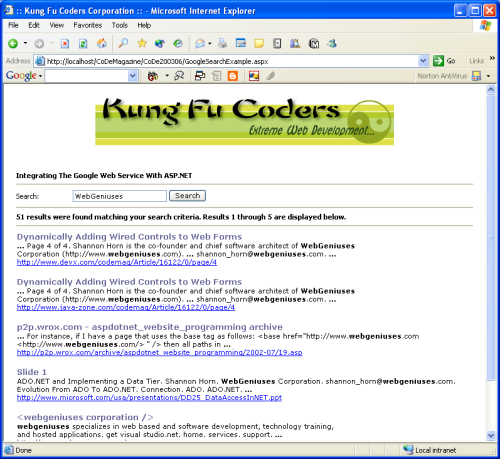
The final piece of the puzzle is to display the results that were found by the search. A lot of developers who use the Google Web Service will return the results using one of the databound list controls such as a DataList control. My example project manually creates a DataTable, iterates through the collection of search results, and then populates the DataTable. In the snippet below I called the collection of search results resultElements. The snippet below shows the code that performs this step. You can download the full source code for the example project. Figure 4 shows the output from the example project.
// Build a table based on the results of the
// query.
dtResults.Columns.Add(new
DataColumn("Title",typeof(string)));

dtResults.Columns.Add(new
 DataColumn("Summary",typeof(string)));

dtResults.Columns.Add(new
DataColumn("URL",typeof(string)));

// Iterate through the results collection and
// build a row for each result.
for (int resultCounter = 0; resultCounter <
numberResults;resultCounter++)
{

 drResult = dtResults.NewRow();

 drResult["Title"] =
googleSearchResult.resultElements[resultCounter].title;

 drResult["Summary"] =
googleSearchResult.resultElements[resultCounter].snippet;

 drResult["URL"] =
googleSearchResult.resultElements[resultCounter].URL;

 dtResults.Rows.Add(drResult);
}

// Bind the datagrid.
dlResults.DataSource = dtResults;
dlResults.DataBind();
pnlResults.Visible = true;
In addition to the functionality shown above, the example project includes simplistic code that displays next and previous paging links at the bottom of the page. This lets the user navigate back and forth between the first five results and the second five results of the first ten results.
Just the Tip of the Iceberg
Hopefully this article has opened your eyes to the possibilities available for performing powerful Web searches using the Google Web service. The example project illustrates the basics of a straightforward search solution. However, the possibilities are quite broad. You could easily wrap up the entire search capabilities illustrated here into a Web User Control and use it in a small section of a page. You could perform searches using virtually any control event on an ASP.NET page including clicking linkbuttons and making a selection from a listbox.
Table 1. The arguments required by the doGoogleSearch function member.
| Name | Description |
|---|---|
| key | Provided by Google, you must use this license key to access the Google service. Google uses the key for authentication and logging. |
| q | The query term that Google should search for. |
| start | Zero-based index of the first desired result. |
| maxResults | Number of results desired per query. The maximum value per query is 10. Note: If you do a query that doesn't have many matches, the actual number of results you get may be smaller than what you request. |
| filter | Activates or deactivates automatic results filtering, which hides very similar results and results that all come from the same Web host. Filtering tends to improve the end user experience on Google, but for your application you may prefer to turn it off. |
| restricts | Restricts the search to a subset of the Google Web index, such as a country like "Ukraine" or a topic like "Linux." |
| safeSearch | A Boolean value that enables filtering of adult content in the search results. |
| lr | Language Restrict: Restricts the search to documents within one or more languages. |
| ie | Input Encoding: This parameter has been deprecated and is ignored. All requests to the APIs should be made with UTF-8 encoding. |
| oe | Output Encoding: This parameter has been deprecated and is ignored. All requests to the APIs should be made with UTF-8 encoding. |
