


Wiki Web sites (Wikis) are great collaboration tools that you can easily create with ASP.NET.
This article describes some of the advantages that Wiki Web sites provide and how you can use ASP.NET and SQL Server to create your own Wiki. You'll learn how to write powerful parsers using the .NET regular expressions class and you'll discover how to add sophisticated search functionality to your Web sites by using SQL Server's Full-Text Search service.
Imagine you visit a Web site that offers information about .NET. You start reading one of the pages about the String class and then realize that the syntax of one of the methods is incorrect. You click the Edit button, update the syntax of the method, update the example that describes how to use the method, and save your changes so that future readers benefit from your contribution. You've just used a Wiki Web site.
In a Wiki Web site, the owners of the information can update their information. This increases the likelihood that the information is always up-to-date and it allows users to constantly improve the content.
Wikis allow users to edit the content of current Web pages. Wikis also give users the ability to add new Web pages as well. To edit a topic, users just click an Edit button. Any text entered in CamelCase notation (two or more words smashed together, such as the word CamelCase or DevCon) automatically become links to the new topic. The user can then follow this link and edit the contents of that new topic.
Ward Cunningham, the author of the first Wiki, defined the Wiki concept as “the simplest online database that could possibly work.”
As you will see in this article, Wikis are simple online databases that users can access through a Web site. Despite their simplicity, they provide a great tool for people to collaborate and create knowledge bases.
Administrators and developers maintain most of the existing Web sites. It is very easy to overlook how different a Web site maintained by users is, the effects that this has on the community of users, and the quality of the information.
In a Wiki Web site, the owners of the information can update their information. This increases the likelihood that the information is always up-to-date and it allows users to constantly improve the content.
Collaborating with Wiki Web Sites
Wikis are collaboration tools. If you have a project where several people would like to collaborate on the production of information, you may want to use a Wiki for the job.
For example, you can use a Wiki Web site to store documentation about a software development project. Users can use the Wiki to add new requirements to the project as new needs arise, developers can post design documentation as they work on the system, testers can store test results, managers can post project schedules, team members contact information, as well as information about clients, providers, and vendors associated with the project.
You can also use Wikis as Personal Information Managers. You can use a Wiki to store information about your favorite books, pictures from your latest trip the Mayan ruins, and general information that you would like to share with other people.
Advantages
Wiki Web sites promote collaboration. If you have not yet visited a Wiki Web site, you will be amazed by the amount of information that people can generate over time when they work together on a specific topic. Unlike blogs (Web logs) where the information goes one-way (from the author to his or her readers), Wikis provide a true two-way communication channel in which everyone is an author and a reader.
Wikis also work with existing technologies. Anyone with a browser and an Internet connection can visit a Wiki Web site and make contributions. Users don't need to have an specific text editor or another software installed on their computer in order to use a Wiki.
Disadvantages
Despite all of their beauty, Wikis come with some disadvantages that you need to consider before you decide to host a Wiki Web site in your organization.
You can configure Wiki Web sites to be public Web sites that anyone can have access to, or you can create private Wiki Web sites and restrict access only to people in your organization. Regardless of the type of access that you provide, the fact that any user can edit a topic could create a security risk for you. Users could inadvertently delete text or change the meaning of an existing sentence. However, most Wiki implementations provide a mechanism to restore a topic that was (consciously or unconsciously) changed.
Another obvious disadvantage of Wiki Web sites is the lack of a What-You-See-Is-What-You-Get (WYSIWYG) editor. Most Wiki implementations use a rather rudimentary text editor (an HTML input control) to allow users to edit topics. If you want text to look bold, for example, you need to enter some sort of tags to make this happen. Compared to Word processors available nowadays, this is really a bummer.
Popular Wiki Web Sites
Despite the disadvantages, Wikis have proven to be a valuable tool. You can visit a rather larger number of public Wiki Web sites to see the concept in action. Two well-known Wikis that you might want to check out include:
- Portland Pattern Repository has more than 26,000 topics that cover a large number of areas of interest, most of them related to software development. This site is a great resource to learn about Wiki Web sites in general as well. http://c2.com/cgi/wiki
- Wikipedia is an online encyclopedia that uses the Wiki concept and it includes over 175,000 topics. http://www.wikipedia.org/
DotWiki Project
You can choose from several implementations (Wiki clones) that allow people to host Wiki Web sites. In the following sections I will discuss creating a wiki from scratch. This project will be called DotWiki and will be implemented using ASP.NET, VB.NET, and SQL Server/MSDE.
DotWiki Web Pages
Words in CamelCase notation follow a pattern in which the first character is an uppercase character, followed by a few lowercase characters, followed by another uppercase character, followed by more lowercase characters.
The main Web page of the DotWiki is the Default.aspx Web page. On Default.aspx you can display topic information and let users edit their content. Figure 1 shows how this page looks from the developer's perspective.
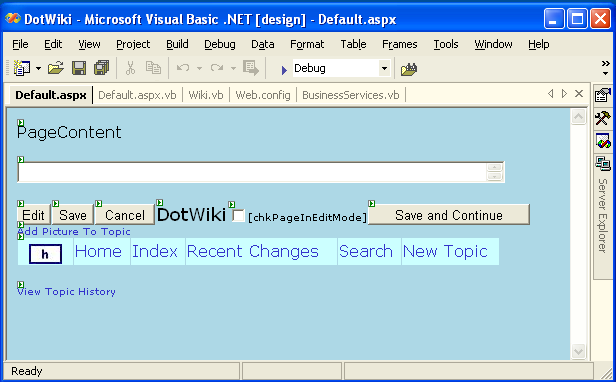
The Default Web page has a view mode and an edit mode.
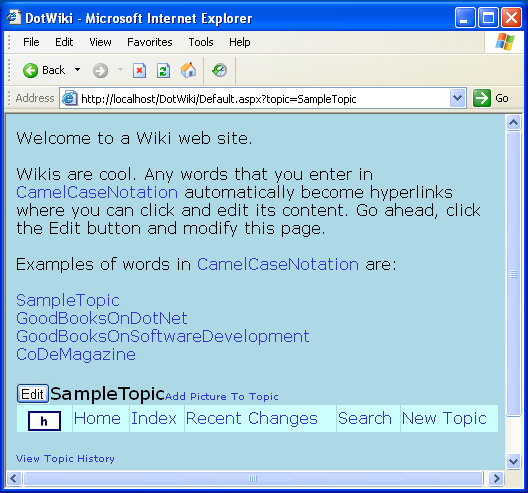
In view mode the Wiki assigns the topic information to a label control on the page (PageContent in Figure 1) so that the browser can display the information. View mode for this page also makes the Edit button visible and hides the Save and Cancel buttons. Figure 2 shows this in view mode.
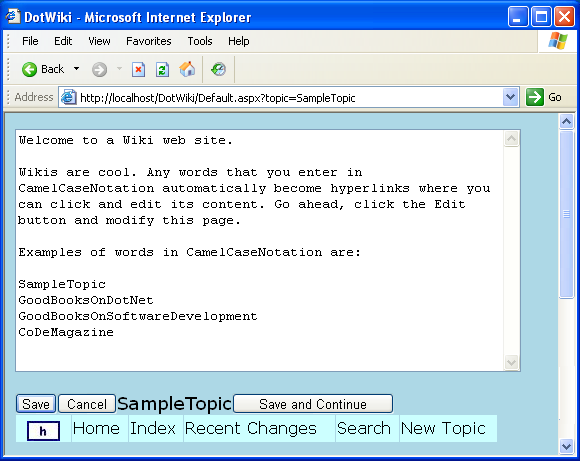
In edit mode (Figure 3), the Wiki assigns the topic information to a textbox control and makes the Save and Cancel buttons visible. The text control on this page is a multi-line control so that it automatically stretches to display multiple lines of text. Listing 1 shows the main method used by Default.aspx to display topic information.
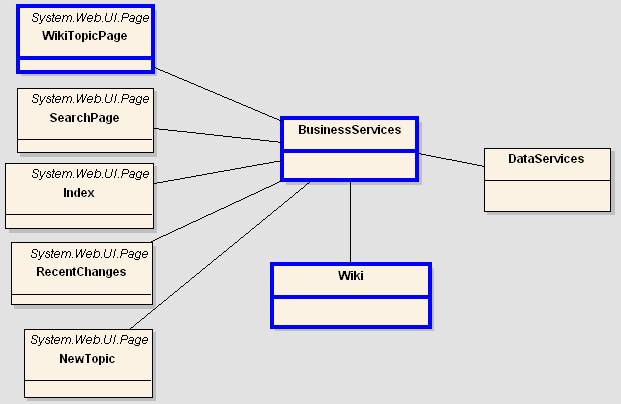
Other pages that support the DotWiki project include an Index page that displays the list of topics in the database, a RecentChanges page that displays the topics that have changes in the last 24 hours, and the Search page that allows users to look for information stored in the database. These basic Web pages have somewhat limited functionality since most of the functionality that powers them resides in the Business Services class.
Class Structure of the DotWiki
The DotWiki project contains three main classes:
- A web page used to display and edit topic information.
- A business object that reads and saves data from the database.
- A parser that performs translations on the text coming from the database before it is displayed.
Figure 4 shows the class diagram of the DotWiki project. I've drawn the main classes with a blue border.
DotWiki Mechanics
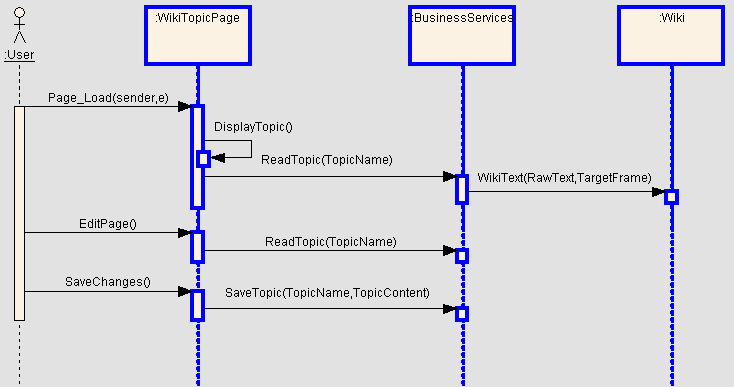
When users visit the DotWiki, the Wiki loads Default.aspx and automatically loads a topic from the database. When a user clicks on a CamelCase word inside the topic, the Wiki page calls the BusinessObject to load the record corresponding with the clicked CamelCase word. The Default.aspx Web page then calls the Wiki parser to process the topic coming from the business object, and eventually the browser renders the topic.
When a user clicks the Edit button, the Default.aspx page switches itself to edit mode and displays the content of the topic in a textbox so that the user can make modifications to the text. When the user clicks the Save button, the Wiki page passes the new text to the Business Object so the text can be sent to the database, and finally the Default.aspx Web page switches back to view mode.
Figure 5 illustrates how these classes interact with each other as a user visits the Wiki.
Database
The DotWiki stores all of its information in a database. Although users can enter many topics and each topic can be as lengthy as a user decides to make it, the database that supports the DotWiki project is very simple.
Full-Text Search allows you to perform sophisticated text searches where you can find variations of a word and rank the results.
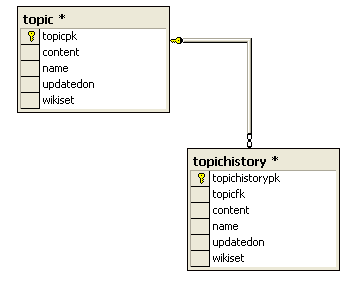
The DotWiki database contains only two tables: TOPIC and TOPICHISTORY. The TOPIC table stores content information while the TOPICHISTORY table stores the previous version of each of the topics in the database.
When users edit a topic, the Wiki copies the current version in the TOPIC table to TOPICHISTORY and writes the new version in TOPIC table. This way the Wiki stores the most recent version of each topic in the TOPIC database.
Figure 6 shows an entity relationship diagram of the two tables that the DotWiki uses.
Business Services
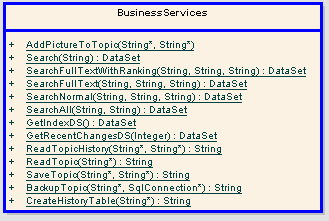
Although users see and use Web pages when they visit the DotWiki, most of the actual work happens inside the Business Services class. The Business Services class receives requests from the Web pages, goes to the database to read/write data, and passes back the results to the Web pages.
For example, the Index.aspx Web page calls the GetIndexDS method of the Business Services class to get a list of topics in the database. Likewise, the FileUpload.aspx Web page calls the AddPictureToTopic method of this class to include a reference to a picture in a particular topic.
Figure 7 shows the methods that the BusinessService class implements.
Parser
One of the most important classes of the DotWiki, the Wiki class, basically parses text coming from the database and returns a “browser friendly” version of the text passed to it. For example, a user might enter the following text in a Web page:
The Wiki class analyzes this text and replaces all CamelCase words with hyperlinks. Since HTML does not honor carriage return or line feed characters, the Wiki class will add HTML <br> tags wherever the user entered a carriage return to ensure the browser displays the text in the corresponding lines. Here you can see what the Wiki will return for the text mentioned above. (The text added by the parser is bold.)
The Parser replaces each CamelCase word with a hyperlink that loads the Default page back again. Notice that each CamelCase points to a different topic in the database.
Although most programming languages provide functions to find exact matches of a string inside another string, each language provides its own way of doing this. (For example, VB uses the InStr function and C/C++ uses the strstr function.) On the other hand, regular expressions have basically standardized the task of finding patterns inside strings. (See RegEx article sidebar*.)*
Regular expressions are a mathematical notation for describing patterns and they are widely used by developers to find patters in strings. .NET provides a Regular Expression class in the System.Text.RegularExpressions namespace.
Words in CamelCase notation follow a pattern in which the first character is an uppercase character, followed by a few lowercase characters, followed by another uppercase character, followed by more lowercase characters. For example, LouisArmstrong follows this pattern.
The DotWiki project described in this article would consider the words CoDeMagazine and The20thCentury to be CamelCase words.
The DotWiki uses the regular expression below to detect words in CamelCase notation:
Although regular expressions intimidate many developers at first (the expression described above looks anything but regular), you'll find the syntax relatively easy to understand once you know the basics. Table 1 describes what each of the components of the aforementioned regular expression mean.
This snippet demonstrates how you can use this regular expression in .NET to search for CamelCase words and replace them with hyperlinks:
CamelCaseRegEx = "[AZ]\w*[az]\w*[AZ]\w*(?=\b)"
ParsedText = Regex.Replace(TextToParse, _
                  CamelCaseRegEx, _
                  AddressOf EvaluateCamelCaseWord)
The RegEx.Replace call will scan through TextToParse. When it finds text that matches the CamelCaseRegEx, it will call the EvaluateCamelCaseWord method to allow you to perform whatever manipulation you want to do with the text that matches the regular expression. The RegEx class will automatically call EvaluateCamelCaseWord each time it finds a match in the text.
The following code snippet shows EvaluateCamelCaseWord:
Public Shared Function EvaluateCamelCaseWord( _
     ByVal m As Match) As String
Return "<a href=default.aspx?topic=" + _
       m.Value + ">" + m.Value + "</a>"
End Function
The DotWiki also uses Regular Expressions to look for e-mail addresses in the text and replace them with hyperlink e-mail addresses so that users can click the hyperlink and have the user's browser launch their e-mail client. The following code snippet demonstrates how the DotWiki looks for e-mail addresses using a regular expression.
EmailRegEx = "\w+[@][^\s]+"
ParsedText = Regex.Replace( TextToParse, _
                   EmailRegEx, _
                   AddressOf EvaluateEmailAddress)
The next code snippet shows the code that replaces each match of an e-mail address with a hyperlinked version of it. Notice that this snippet also HTML encodes the e-mail address so that spammers cannot easily lift them from the DotWiki Web pages.
Public Shared Function EvaluateEmailAddress( _
ByVal m As Match) As String
   Dim EmailAddress As String = m.Value.ToLower()
   Dim MailTo As String = "mailto:" + EmailAddress
   Return "<a href=" + Chr(34) + _
          HtmlEncoded(MailTo) + Chr(34) + ">" + _
          HtmlEncoded(EmailAddress) + "</a>"
End Function
Inside the Wiki class you will see more uses of Regular Expressions to search and replace HTTP references, carriage returns, and other HTML tags that are interesting for our purposes.
Although I could have built my own parser to manually scan through the text and replace CamelCase words, regular expressions allow me to do it in one line of code. A simple call to RegEx.Replace with the right regular expression does the job. Furthermore, I can apply the same principle to search and replace e-mail addresses and other patterns that interest me by following the same technique. Listing 2 shows the complete code for the WikiText method that performs the parsing on the topic information.
Search Page
Since a Wiki Web page stores all the information in a database, you can imagine how easy it is to look for information. Using a Wiki is like having your own company-wide Web with a built-in search engine.
DotWiki provides a search page where users can enter one or more words that they want to search for in the Wiki database. Behind the scenes, the DotWiki passes the search request to the Search method of Business Services class.
You can configure the Search method via the Web.config file to perform the search in a variety of ways. In a “normal search” (default) the Search method builds a SQL SELECT statement using the LIKE operator in the WHERE clause. For example, if a user enters the word “modeling,” the Search method will build a SQL SELECT like this:
SELECT name
FROM topic
WHERE name LIKE '%modeling%' OR
      content LIKE '%modeling%'
This very powerful SQL SELECT would find the word “modeling” in all topics present. However, there are two problems with this approach.
First, LIKE is a very expensive operator. In a query like the one in the last snippet, SQL Server must perform a full table scan on the TOPICS table and read through all the text in the name and content fields to try to find the word “modeling.” If you have a small number of topics this might not be an issue. However, if you have a rather large number of topics, you'll have performance problems if your users perform many full table scans.
Second, even though SQL Server will perform a full scan on the table, it will only look for instances of the word “modeling,” ignoring variations of the word that might be interesting for the users such as “modeled” or “models”.
Full-Text Search
SQL Server provides a Full-Text Search service that is often a better approach for performing searches in text fields. SQL Server's Full-Text Search service is optimized for large blocks of text. Remember that the DotWiki database is basically a collection of large blocks of text (and remember that each topic can be as large as the users decide to make it).
When you use a full-text search, you ask SQL Server to create a separate index for the text fields. SQL Server optimizes these text indexes for text searches.
SQL Server's Full-Text Search service provides three main features out of the box. First, you can search on text fields without forcing SQL Server to perform a full table scan. Second, a full-text search allows SQL Server to find variations of a word in addition to exact matches. For example, a full-text search on the word “modeling” would find instances of the words “modeling,” “model,” and “modeled,” Finally, the Full-Text Search service provides ranking capabilities so you can tell your users that you've found 100 instances of the word “modeling” and rank the results.
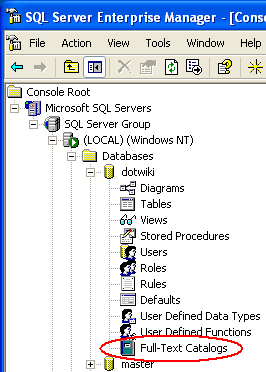
The Full-Text Search Service is not installed by default when you install SQL Server. You can verify whether you've installed the Full-Text Search service on your server via SQL Server's Enterprise Manager. Drill down to a database on your server. If you see a node called Full-Text Catalogs in your database, you have the feature installed (Figure 8). If the service isn't on your server, you can add this feature at any time by running SQL Server's setup program and then select the Full-Text Search option. If you do this, you must reapply SQL Server service packs to your server, otherwise the Full-Text Search service will be installed but disabled on your server.
With Full-Text Search installed on your server, you can run the Full-Text Indexing wizard located in the Tools option of SQL Server's Enterprise Manager. This wizard will guide you through the required steps to configure full-text search in your database. This process includes:
- Create a full-text catalog in the database.
- Create a full-text index in the table.
- Populate the full-text index for the first time.
- Schedule incremental updates of the full-text index.
A comprehensive explanation of the SQL Server Full-Text Search service requires an article of its own. However, you can get started with the documentation that SQL Server Books Online provides on the subject.
Once you have set up your database for full-text search, you can use the FREETEXT and CONTAINS predicates in the WHERE clause of your SQL SELECT statements. The following code snippet uses the CONTAINS predicate to look for the word “modeling” and its variations (inflectional forms).
SELECT *
FROM topic
WHERE CONTAINS ( *, 'FORMSOF( INFLECTIONAL, "modeling" )' )
Additionally, you can use the FREETEXTTABLE and CONTAINSTABLE functions in your SQL SELECT statements. You use these functions in the FROM clause and they return a table with two columns: key and rank. Use the key column to join the returned table to your base table and the rank column to sort the records by relevance. The following code snippet uses the FREETEXTTABLE function. Notice the join with the TOPIC table (by using the key field) and the ORDER BY rank.
SELECT name, content, rank
FROM topic
   INNER JOIN FREETEXTABLE( topic, *, 'modeling' )
   AS ft ON topic.topicpk = ft.[key]
ORDER BY rank
In the DotWiki code, the Search method of the Business Services class encapsulates the search process and the calls to SQL Server. This method will create the appropriate SQL SELECT statement to perform a typical search (using the LIKE operation) or a full-text search depending on the search method defined in the Web.config file.
Summary
Wiki Web sites are great collaboration tools and they are easy to implement with ASP.NET and SQL Server.
Think of all the Web sites in your organization where users would like to always have the latest version of their information. Using a Wiki, users don't need to depend on an administrator to update the content, they can augment their information and correct their own mistakes, and you can keep a record of changes so that users can trace how they arrived at the current conclusion.
We barely touched the surface of some of the things that you can do with .NET regular expressions and SQL Server's Full-Text Search service. I hope this article sparks your interest and gives you new alternatives to do text parsing and implement search features in your Web sites.
Complete source code for the DotWiki clone presented in this article is available at: http://www.hectorcorrea.com
Listing 1: Method in the Default.aspx Web page to display topic information
Private Sub DisplayTopic()

If Me.chkPageInEditMode.Checked Then

            Me.PageHeader.EnableLinks = False

            Me.txtPageContent.Visible = True
            Me.lblPageContent.Visible = False
            Me.lblPageContent.Text = ""
            Me.cmdEdit.Visible = False
            Me.cmdSave.Visible = True
            Me.cmdSaveAndContinue.Visible = True
            Me.cmdCancel.Visible = True
            Me.txtViewHistory.Visible = False
            Me.txtAddPicture.Visible = False

            Me.txtPageContent.Text= ReadTopic(Me.lblPageTopic.Text)
            Me.lblPageContent.Text = ""

        Else

            Me.PageHeader.EnableLinks = True

            Me.txtPageContent.Visible = False
            Me.txtPageContent.Text = ""
            Me.lblPageContent.Visible = True
            Me.cmdEdit.Visible = True
            Me.cmdSave.Visible = False
            Me.cmdSaveAndContinue.Visible = False
            Me.cmdCancel.Visible = False
            Me.txtViewHistory.Visible = True
            Me.txtAddPicture.Visible = True

            Dim Content As String = ReadTopic(Me.lblPageTopic.Text)
            Me.lblPageContent.Text = WikiText(Content, "")
            Me.txtPageContent.Text = ""

        End If

End Sub
Listing 2: WikiText method to parse topic information before rendering in the browser
Public Shared Function WikiText( _
               ByRef CamelCaseRegExp As String, _
               ByRef RawText As String, _
               ByRef TargetFrame As String) As String

        Dim ParsedText As String

        ' Hyperlink HTTP references
        ParsedText = Regex.Replace(" " + RawText, _
                 HttpRegEx, _
                 AddressOf EvaluateHttpReference,
           CamelCaseOptions Or RegexOptions.IgnoreCase)

        ' Hyperlink e-mail addresses
        ParsedText = Regex.Replace(ParsedText, _
                 EmailRegEx, _
                 AddressOf EvaluateEmailAddress)

        ' Hyperlink CamelCase words.
        If TargetFrame.Length = 0 Then
            ParsedText = Regex.Replace(ParsedText, _
                 CamelCaseRegEx, _
                 AddressOf EvaluateCamelCaseWord, _
                 CamelCaseOptions)
        Else
            ' Frames version.
            ParsedText = Regex.Replace(ParsedText, _
                 CamelCaseRegEx, _
                 AddressOf EvaluateCamelCaseWordContentFrame, _
                 CamelCaseOptions)
        End If

        ' Replace carriage returns with <br> when they are...
        ParsedText = Regex.Replace(ParsedText, _
               "\b\r\n", "<br>", CamelCaseOptions)

        ' Render IMG SRC tags as pop up windows
        ParsedText = Regex.Replace(ParsedText, _
              "\<img src=.+?\>", _
              AddressOf EvaluatePopUpImage)

        Return ParsedText

End Function
| Token | Meaning |
|---|---|
| [A-Z] | We are looking for an uppercase character (A-Z) |
| \w* | That can be followed by zero or more (*) word characters (\w) |
| [a-z] | That must be followed by at least one lowercase character (a-z) |
| \w* | That can be followed by zero or more (*) word characters (\w) |
| [A-Z] | That must be followed by one uppercase character |
| \w* | That can be followed by zero or more (*) word characters (\w) |
| (?=\b) | That must end in a word boundary (\b) |
