


As the core API set underpinning managed application development in .NET, the Base Class Libraries, receive several long-awaited and notable additions in the Whidbey release.
The Base Class Libraries (BCL) provide a standardized set of managed APIs to accomplish all of the common and most widely executed application tasks. BCL enhancements surface in as performance-based improvements, class-oriented feature additions, and the introduction of previously missing functionality through entirely new classes.
The Base Class Libraries were first introduced as a core component of the .NET Framework back in January 2002. The introduction of the BCL represented a huge step forward in simplicity and consistency of API design for application development. Through provision of a standard hierarchical design known as namespaces, the BCL removed many of the downsides but did not eliminate all of the need for leveraging unmanaged or third-party APIs.
The ability to leverage the Data Protection API (DPAPI) takes a dramatic step forward in Whidbey. The ProtectedData and ProtectedMemory classes simplify the process of encrypting data to a single line of code.
The .NET Framework 1.0/1.1 provided a BCL set that can be segmented into three functionality groups: a managed group, a managed wrappers group, and a support services group. The managed group contains classes consisting mostly of managed code implementations that replace unmanaged APIs. A perfect example of this is ADO.NET found in System.Data. The second group consists of managed wrappers around code or services still implemented as unmanaged code. An example of this can be found in the System.EnterpriseServices namespace that exposes COM+ Services to managed classes. The final functionality group provides support services to facilitate interoperability between the managed and unmanaged APIs. Many of these classes can be found in System.Runtime.InteropServices.
Many of the enhancements to the Whidbey BCL set focus on the managed group of classes. Although the interoperability support provided by the BCL allows seamless use of unmanaged code, providing similar functionality as true managed classes improves the performance, general ease of use, and reduces the dependency on proper installation of the underlying unmanaged code being replaced.
The Whidbey BCL offers new classes as well as new features for existing BCL classes that greatly simplify a number of common tasks. Some of these new classes can be considered information classes, designed to facilitate information acquisition. Some BCL enhancements provide improved network support or network-oriented features. Other BCL enhancements offer completely new functionality, some of which I'll describe below.
I can't cover all the changes to the BCL in this short space; I will cover some of the more important or noticeable areas of improvements. My article discusses the alpha version of the Whidbey BCL, which will continue to evolve, improve, and change as Microsoft moves through the alpha and beta process.
New Classes
Many of the new Whidbey BCL classes provide functionality directly through the .NET Framework that were previously available to developers only through COM interoperability and/or third-party APIs, or functionality that could be obtained through substantially less convenient avenues.
Obtaining Drive Information
One new BCL enhancement, the DriveInfo class which you'll find in the System.IO namespace, provides functionality similar to the FileInfo and DirectoryInfo classes already found in the System.IO namespace. DriveInfo provides methods and properties to query information about a current drive on the system or, through the shared GetDrives method, retrieves an array of DriveInfo objects representing all the logical drive names on a computer. Developers will typically use this class to determine available size, or total size, as shown in Figure 1, or to determine whether a drive is a hard disk, network share, or floppy drive. To retrieve information about the “C” drive, you could use code similar to the following:
Dim c As New DriveInfo("C")
Console.WriteLine("Data for Drive C:")
Console.WriteLine("Avail: {0} bytes", _
                   c.AvailableFreeSpace)
Console.WriteLine("Total Free: {0} bytes", _
                   c.TotalFreeSpace)
Console.WriteLine("Format: {0}", c.DriveFormat)
Console.WriteLine("Type: {0}", c.DriveType)
Console.WriteLine("Name: {0}", c.Name)
Console.WriteLine("Size: {0}", c.TotalSize)
Console.WriteLine("Label: {0}", c.VolumeLabel)
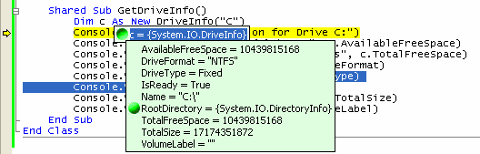
Use of the DriveInfo class allows upper- or lower-case logical names in the class constructor, but cannot be used on network shares with a UNC path.
Generating Hash Values
Generation of hash values for data streams is one of the least sexy tasks for the average developer, but occasionally this task is core to data security and reliability. One use of computed hash values, Hash-based Machine Authentication Codes (HMAC), allows determination of message tampering when sending data over unsecure transmission lines. Any change in the associated data upon which the HMAC is computed results in a mismatched hash value, signaling an invalid or tampered message.
With the enhancements made to the Console class, console-based applications may never be the same.
In the Whidbey BCL, Microsoft has added an additional collection of HMAC classes to System.Security.Cryptography.
- HMACMD5
- HMACRIPEMD160
- HMACSHA256
- HMACSHA384
- HMACSHA512
Simplifying Encryption Options
Cryptography is a complex concept and the typical requirement for applications to layer both asymmetrical (public/private key) and symmetrical (secret key) cryptography algorithms together to achieve security goals increases the difficulty in implementing basic encryption in applications. The existing classes in System.Security.Cryptography greatly simplify encryption tasks in general, with the notable exception of using DPAPI (Data Protection API).
The DPAPI is a pair of unmanaged, OS-level data protection calls that allow encryption of information at the OS-level without dependence on additional, extended cryptography APIs. DPAPI eliminates the need to directly persist the traditional key information required by both symmetrical and asymmetrical encryption processes. The elimination of key persistence requirements is accomplished by basing the key information on user profile information provided by the OS. The OS uses the profile information to regenerate the desired keys dynamically during encryption or decryption.
The Whidbey BCL enhancements include two new classes that trivialize any difficulty in using P/Invoke to access the unmanaged DPAPI calls: ProtectedData and ProtectedMemory. These classes greatly simplify using DPAPI from a managed application.
The ProtectedData class allows you to easily encrypt a byte array of data with a single method call. The following code uses the ProtectedData class to encrypt a byte array with a single line of code:
Sub ProtectDataDemo(ByVal data() As Byte)
    data = ASCII.GetBytes("data to protect!")
    Dim enc() As Byte
    enc = ProtectedData.Protect( _
             data, Nothing, _
             DataProtectionScope.CurrentUser)
    Console.WriteLine("Encrypted data: {0}", _
             ASCII.GetString(enc))
    Dim dec() As Byte =
    dec = ProtectedData.Unprotect( _
             enc, Nothing, _
             DataProtectionScope.CurrentUser)
    Console.WriteLine("Restored data: {0}", _
             ASCII.GetString(dec))
End Sub
The Protect and Unprotect methods of the ProtectedData class require a scope for the data encryption process. The scope determines the context used for generating the necessary keys; the possible values are described in Table 1. Using an incorrect scope renders the decryption process useless.
The ProtectedMemory class allows the developer to protect data directly in memory without the requirement that a copy of the data be made first. Encrypting the data in place enables the unique feature that even a memory dump produces only encrypted information for the protected memory. Data being encrypted in memory with the ProtectedMemory class must be either 16 bytes in length, or a multiple of 16 bytes. The following code shows an instance of the ProtectedMemory class being used to protect a byte directly in memory:
Sub ProtectedMemoryDemo()
    Dim data() As Byte = {100, 97, 116, 97, _
               32, 116, 111, 32, 112, 114, _
               111, 116, 101, 99, 116, 33}
    Console.WriteLine("Original data: {0}", _
                       ASCII.GetString(data))
    ProtectedMemory.Protect(data, _
              MemoryProtectionScope.SameLogon)
    Console.WriteLine("Protected data: {0}", _
              ASCII.GetString(data))
    ProtectedMemory.Unprotect(data, _
              MemoryProtectionScope.SameLogon)
    Console.WriteLine("Restored data: {0}", _
              ASCII.GetString(data))
End Sub
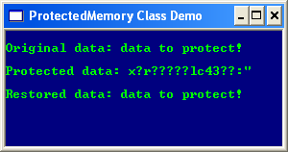
The Protect and Unprotect methods of the ProtectedMemory class require a memory scope for the encryption process. The scope determines the context within which the protected memory can be decrypted. Possible values for the memory scope are described in Table 2. In the alpha code for Whidbey, the documentation indicates that the behavior of this class is supported only on Windows 2003 or later, although my example of the ProtectedMemory class shows that it works on Windows XP as shown in Figure 2.
Obtaining Configuration Details
Enhancements to the BCL provide options for retrieving and updating configuration information from managed code. The Configuration class, found in the System.Configuration namespace, provides the ability to easily retrieve machine configuration information. Much of the System.Configuration namespace is contained in the System.dll assembly, but the Configuration class is contained within System.Web.dll. If you want to retrieve connection string information, in particular, from the new <connectionStrings*>* configuration schema element, new features to the ConfigurationSettings class are an easier route to follow. For example:
Dim config As Configuration = _
    Configuration.GetMachineConfiguration( _
                                   "localhost")
Dim section As ConfigurationSection = _
    config.Sections("connectionStrings")
Dim node As XmlNode = section.GetRawXml

' Simpler route using ConfigurationSettings
Dim conn As String = _
    ConfigurationSettings.ConnectionStrings. _
                                   Item("c1")
Tracing to the Console
The Trace class provides a standard process for tracing code executing application instrumentation. BCL enhancements include a new ConsoleTraceListener class that joins the existing DefaultTraceListener, EventLogTraceListener and TextWriterTraceListener classes. The ConsoleTraceListener class abstracts the process of sending tracing statements to a console. This simplifies the process of including the console as a destination for trace messages by eliminating the need to write a custom listener to accomplish this goal. In the following code snippet, I'l add a new instance of the ConsoleTraceListener to the Listeners collection:
Sub SetUpListener()
  Trace.Listeners.Clear()
  Trace.Listeners.Add(New ConsoleTraceListener)
  Trace.WriteLine("Console Listener initiated")
End Sub
Timing Code Execution
Timing code execution from a non-arbitrary point A to another point B in code has never been a difficult thing to accomplish. On the other hand, the .NET Framework did not simplify this task. The BCL adds a Stopwatch class that provides methods and properties to accurately measure elapsed time.
The Stopwatch class provides all of the intuitive features you expect to find. Call the Start method to instruct the class to begin counting from the current elapsed time value. Do not start an already running Stopwatch, as it has no impact. Call the Stop method to end the current time measurement recording or to establish an interval time and pause the Stopwatch. Do not stop an already stopped Stopwatch, as it has no impact. Call the Start method again to resume time measurement recording. Call the Reset method to clear the cumulative elapsed time.
You can retrieve the elapsed time for a Stopwatch instance by checking the Elapsed, ElapsedTicks, or ElapsedMilliseconds properties**.** You can call ElapsedTicks to retrieve a raw indicator of elapsed units or use the Frequency field to determine the relationship between ticks and actual elapsed time in direct terms such as milliseconds.
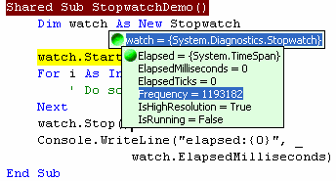
A tick is the smallest unit a Stopwatch measures. A Stopwatch tick is not the same as a System.Ticks value. A System.Ticks value represents a 100-nanosecond span. A Stopwatch tick represents a time interval equal to one second divided by the value of the Frequency field. For example, a high-frequency timer, such as that shown in Figure 3, has a Frequency value in the millions, providing sub-millisecond elapsed time resolution granularity. Support of the hardware and OS is required for the underlying timing mechanism to provide high-resolution. Check IsHighResolution to determine whether the Stopwatch supports high-resolution elapsed time intervals.
Improving Graphics Performance
Applications that require multiple complex painting operations can result in flickering during the drawing process. The solution to this common problem involves a technique known as double-buffering. When employing a double buffering technique, you leverage an interim memory buffer to execute multiple graphics operations. After completing the multiple drawing operations, the result is drawn directly to the targeted drawing area in a single operation, avoiding the flickering issue.
Use the BufferGraphics class, provided as an enhancement to the BCL, to simplify custom advanced double buffering. The BufferGraphics object you use for a given application is acquired by calling the Allocate method of the current application domain's BufferedGraphicsContext instance, which in turn you obtain by accessing the shared System.Drawing.Current property.
Once you instantiate an instance of BufferedGraphics, you render graphics to the in-memory graphics buffer by accessing the Graphics property. You can paint to the Graphics object provided by the Graphics property exactly as you do now. Once you complete your drawing operations, you call the Render method to copy the contents of the in-memory buffer to the final drawing surface. If you attempt to access the BufferedGraphics instance from multiple threads, use appropriate synchronization mechanisms to avoid conflicts.
Existing Class Enhancements
Not all the enhancements to the BCL are implemented as entirely new classes. After much feedback from clients, Microsoft has started to insert many highly desired improvements to existing BCL classes.
Simplified File Reading and Writing
Reading and writing to a file is easy to accomplish, but certain file access scenarios are not as simplified as they should be. Prior to Whidbey, file access for reading or writing typically involved instantiating a FileStream object with the desired access mode, reading or writing a byte array to or from the file, and then closing the FileStream object. If the file contents consisted of text, the byte array needed to be converted, adding another step. Alternately, the FileInfo class provided methods to create StreamReader and StreamWriter classes allowing the direct reading or writing of text. Using a FileInfo class and StreamReader or StreamWriter classes added extra steps to the process.
In Whidbey, the File class gains several shared methods designed to simplify file access. Previously, the File class was used indirectly to access files by providing methods to create FileStream, StreamReader, or StreamWriter classes that perform the actual file manipulations. The File class is now enhanced with six new methods that directly manipulate file contents in a single method call.
- ReadAll
- ReadAllBytes
- ReadAllLines
- WriteAll
- WriteAllBytes
- WriteAllLines
All six methods open the file specified by a path parameter, read or write the data involved, and then close the file. The write methods create the file and overwrite the file if it already exists. The ReadAll and WriteAll methods operate on a single string, ReadAllBytes and WriteAllBytes operate on byte arrays, and ReadAllLines and WriteAllLines interact with an array of strings. In the following code snippet, the WriteAllLines method is used to write a string array directly to a file with a single method call:
Sub SimplifiedFileAccess()
    Dim lines(3) As String
    lines(0) = "This"
    lines(1) = "     is"
    lines(2) = "        demo"
    lines(3) = "             file"

    File.WriteAllLines("c:\File.txt", lines)
    Console.Write(File.ReadAll("c:\File.txt"))
End Sub
Improving Graphics Performance
The new BufferedGraphics class provided in the BCL is intended for manual double buffering scenarios where manual coding and control is desired. For general-purpose double buffering needs, the easiest route to leverage double buffering for Windows Forms or custom controls is built into the Control class found in the System.Windows.Forms namespace. In prior versions of the BCL, double buffering was enabled for controls by using the SetStyle method of the Control class to set the style bit to True for three different styles.
- ControlStyles.AllPaintingInWmPaint
- ControlStyles.DoubleBuffer
- ControlStyles.UserPaint
Double buffering is now simplified and optimized. The Control class provides a new DoubleBuffered property and the existing SetStyle method is used to set a new style bit of the Control class called OptimizedDoubleBuffering. Set either of these values to True to implement the same behavior as setting the style bits separately for both AllPaintingInWmPaint and UserPaint to True. The existing DoubleBuffer style bit is now deprecated. The OptimizedDoubleBuffering style behavior redirects all painting operations for the control through a default graphics buffering, greatly reducing flickering without additional code required.
Not Your Grandpa's Console
The BCL class that gains the most new features is the Console class. Prior to the new features, the Console class allowed limited input and output buffer access, and interactions limited to very linear scenarios. Reading and writing task interactions with the screen buffer were dictated by the simple Read, Write, ReadLine, and WriteLine methods.
Enhancements to the Console class enable complete control over positioning of the cursor, foreground and background colors, and the ability to move sections of text, including color scheme, around the screen buffer. Moving text around the screen buffer eliminates the need to manually reconstruct the information in the screen buffer at the new location. The new properties supported by the Console class, shown in Table 3, allow extensive abilities to manipulate the buffer screen characteristics. The possible color choices have been expand to 16 choices.
The Console class gains numerous methods and a new event. You can call the Beep method to issue a system beep. You can call the Clear method to move the cursor to the upper-left corner and clear the screen buffer using the current values of the ForegroundColor and BackgroundColor properties. Call the ResetColor method to revert back to the default console color scheme. You can call the SetBufferSize method to programmatically control the size of the screen buffer and call MoveBufferArea to reallocate characters and their current color scheme from one section of the screen buffer to another without manually reconstructing the screen buffer section affected. You use a combination of the KeyAvailable property and the ReadKey method to grab user input character by character without blocking the executing thread. You handle the CancelKeyPress event to perform complex logic in response to the user typing Ctrl-C.
The enhancements to the Console class provide significantly increased options for developing highly interactive console-based applications that are far more visually appealing than the traditional console-based application. These applications don't have the overhead associated with moving to a full-blown graphical-based user interface provided by Windows Forms-based applications.
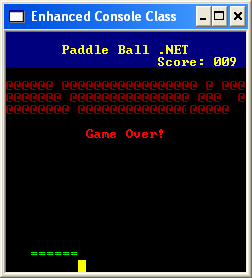
An example of many of these features in action together is shown in Figure 4, and the complete code listing is in Listing 1.
Enhancing Network Support
Many enhancements have been added to the BCL to provide additional support for network-based tasks. The System.Net and System.Web namespaces already provide very strong support for most network activities, but the existing BCL set did not provide direct managed support for several common tasks.
Obtaining Network Information
The new NetworkInformation class, found in the new namespace System.Net.NetworkInformation, provides network statistical information and IP configuration for the local computer. You create an instance of the NetworkInformation class and on instantiation, this class automatically populates its properties by calling the unmanaged GetNetworkParams native API method. The NetworkInformation class provides numerous methods to actively retrieve assorted network statistical information. These retrieval methods include:
- GetActiveUdpListeners
- GetIcmpV4Statistics
- GetIcmpV6Statistics
- GetIPStatistics
- GetTcpStatistics
- GetUdpStatistics
The network statistic methods are very powerful, but are not that interesting to many developers. Some generically useful methods are provided by NetworkInformation. The most useful, powerful, and simplistic method of all is the GetIsConnected method. You call GetIsConnected to determine in real-time if at least one of the computer's network interfaces is physically connected to the network. Use the GetNeworkInterfaces or the GetTcpConnections methods to retrieve object references representing the network interface devices and the current TCP connections on the local computer.
The NetworkInformation class can also be used to receive dynamic communication about changes in network interface address assignments. You provide an event handler for the AddressChanged event and initiate listening for change notifications by calling the StartListeningForAddressChanges method. To terminate listening for address changes, you call StopListeningForAddressChanges. An example of listening for network interface address changes is shown in Listing 2.
Managed Support for FTP
Support for issuing numerous types of network requests was provided by version 1.0 of the .NET Framework and the Base Class Libraries. A somewhat obviously missing feature from this network support involved the complete lack of a direct managed class for issuing FTP requests. This oversight is fixed in the Whidbey BCL. The FtpWebRequest class represents a basic FTP interface for issuing requests. The existing WebClient class now also supports the FTP protocol.
Use the Create method of the WebRequest class to obtain an instance of FtpWebRequest. A valid user name and password are required and should be wrapped in a NetworkCredentials class and assigned to the Credentials property of the FtpWebRequest instance. The specific FTP command to issue is controlled by setting the Methods property to one of the values of the FtpMethods structure as follows:
- AppendFile
- DeleteFile
- DownloadFile
- GetFileSize
- ListDirectory
- UploadFile
The return value of an FTP request should be obtained by calling the GetResponseStream method to obtain an instance of the FtpWebResponse class, as shown below:
Const file As String = "ftp://.../Demofile.txt"
Dim ftpReq As FtpWebRequest = _
               WebRequest.Create(file)
ftpReq.Method = FtpMethods.DownloadFile
ftpReq.Credentials = New NetworkCredential( _
                       "anonymous", "demopwd")
Dim ftpResp As FtpWebResponse
ftpResp = ftpReq.GetResponse
Dim ftpRespStream As Stream
Dim reader As StreamReader
ftpRespStream = ftpResp.GetResponseStream
reader = New IO.StreamReader(ftpRespStream, _
                    System.Text.Encoding.UTF8)
Console.WriteLine(reader.ReadToEnd)
The simplest approach to downloading files from an FTP server is provided by the new file transfer protocol supported by the WebClient class. Use the DownloadFile method to issue an FTP request for a file and save it immediately to a file on the local file system, as shown below:
Dim client As New WebClient
Dim reader As StreamReader

client.Credentials = New NetworkCredential( _
                         "anonymous", "demopwd")

client.DownloadFile(TargetFile, "C:\Demofile.txt")
If the destination for a file to be downloaded from an FTP server is not the local file system but the current process, use the DownloadData method of WebClient to retrieve file contents directly, as shown below:
Const target As String = "ftp://.../Demofile.txt"

Dim client As New WebClient
Dim reader As StreamReader

'This example assumes anonymous logon.
client.Credentials = New NetworkCredential( _
                       "anonymous", "demopwd")

Dim destFile As String
destFile =  Encoding.UTF8.GetString( _
                ftpClient.DownloadData(target))
Console.WriteLine(destFile)
Summary
The Base Class Libraries provide the basic foundation for just about every task an application needs to perform. The process of creating a standardized set of consistent application programming interfaces includes the inevitable burden of keeping up with the expectations of the developer community. The task undertaken by the Framework team at Microsoft to craft a collection of APIs that could simultaneously serve as the foundation for a whole new generation of applications, provide a bridge between the Framework and its predecessor (COM), and unite and satisfy the demands of hard core developers from the Visual Basic, C++, and third-party language camps is a substantial task. The only task that could conceivably be more difficult might be to improve substantially on this set of Base Class Libraries.
Although I can only cover a fraction of the changes appearing in the Whidbey BCL here, the changes I did cover should show that significant additions and enhancements to the Base Class Libraries are forthcoming. You can assume that many things will change as the Framework team moves forward into the Beta stages. New features will surface, additional enhancements will be fleshed out and completed, and odds are, maybe even a feature or two will be cut back or removed.
If you step back for a second and look at the enhancements already showing up in the alpha build of Whidbey, you should feel very confident. Given this first look at Whidbey, the future of .NET and the future of application development as a whole seems very strong.
Listing 1: Sample use of the enhanced Console class
Public Class PaddleBall
    Private xB As Integer = 5
    Private yB As Integer = 3
    Private xBDelta As Integer = 1
    Private yBDelta As Integer = 1
    Dim xP As Integer = 2
    Dim Eraser As ConsoleColor = ConsoleColor.Black
    Dim Paddle As ConsoleColor = ConsoleColor.Green
    Dim Ball As ConsoleColor = ConsoleColor.Yellow
    Dim tBall As New Thread(AddressOf MoveBall)

    Public Sub Start()
        ' Setup visual style of console
        InitializeConsole()

        ' Start ball in motion on secondary thread
        tBall.Priority = ThreadPriority.Lowest
        tBall.Start()

        ' Enable paddle control on primary thread
        EnablePaddle()
    End Sub

    Private Sub InitializeConsole()
        ' Setup basic game graphics
        Console.BackgroundColor = Eraser
        Console.ForegroundColor = ConsoleColor.White
        Console.SetWindowSize(30, 20)
        Console.SetBufferSize(30, 20)
        Console.Title = "Enhanced Console Class"
        Console.Clear()
        Console.SetCursorPosition(0, 0)
        Console.BackgroundColor = ConsoleColor.DarkBlue
        Console.ForegroundColor = ConsoleColor.Yellow
        Console.Write("                              ")
        Console.Write("       Paddle Ball .NET       ")
        Console.Write("                   Score: 000 ")
        Console.BackgroundColor = Eraser
        Console.ForegroundColor = ConsoleColor.DarkRed
        Console.Write("                              ")
        Console.Write("@@@@@@@@@@@@@@@@@@@@@@@@@@@@@@")
        Console.Write("@@@@@@@@@@@@@@@@@@@@@@@@@@@@@@")
        Console.Write("@@@@@@@@@@@@@@@@@@@@@@@@@@@@@@")

        ' Draw Paddle
        Console.SetCursorPosition(2, 18)
        Console.ForegroundColor = Paddle
        Console.Write("======")
        Console.CursorVisible = False
    End Sub

    Private Sub MoveBall()
        Do While yB < 19
            SyncLock Me
                ' Erase current Ball
                Console.SetCursorPosition(xB, yB)
                Console.Write(" ")

                xB += xBDelta
                yB += yBDelta

                ' Draw new ball
                Console.BackgroundColor = Ball
                Console.SetCursorPosition(xB, yB)
                Console.Write(" ")
                Console.BackgroundColor = Eraser
            End SyncLock
            If xB = 29 Then xBDelta = -1
            If xB = 0 Then xBDelta = 1
            If yB = 17 And xP <= xB And _
               xB <= xP + 5 Then yBDelta = -1
            If yB = 3 Then yBDelta = 1
            Thread.CurrentThread.Sleep(100)
        Loop
        SyncLock Me
            Console.ForegroundColor = ConsoleColor.Red
            Console.SetCursorPosition(10, 8)
            Console.Write("Game Over!")
        End SyncLock
    End Sub

    Private Sub EnablePaddle()
        Dim key As ConsoleKey
        Dim x2 As Integer

        Do While Not key = ConsoleKey.End
            Select Case key
                Case ConsoleKey.LeftArrow
                    x2 = xP + 5
                    If xP > 1 Then xP -= 1
                Case ConsoleKey.RightArrow
                    x2 = xP
                    If xP < 23 Then xP += 1
                Case Else : x2 = 0
            End Select
            If (key = ConsoleKey.LeftArrow Or _
                ConsoleKey.RightArrow) And x2 > 0 Then
                SyncLock Me
                    Console.SetCursorPosition(x2, 18)
                    Console.Write(" ")
                    Console.SetCursorPosition(xP, 18)
                    Console.ForegroundColor = Paddle
                    Console.Write("======")
                    Console.BackgroundColor = Eraser
                End SyncLock
            End If
            key = Console.ReadKey.Key
        Loop
    End Sub
End Class
Listing 2: The NetworkInformation class simplifies access to current network configuration information
Private Sub GetNetworkInformation()
    Private netInfo As New NetworkInformation

    ' Check Current IP Addresses
    AddressChanged(Nothing, Nothing)

    ' Assign delegate for AddressChanged event
    AddHandler netInfo.AddressChanged, AddressOf AddressChanged
    netInfo.StartListeningForAddressChanges()

    Console.WriteLine("Host Name: {0}", netInfo.HostName)
    Console.WriteLine("Is Connected: {0}", netInfo.GetIsConnected)
    Console.WriteLine("Node type: {0}", netInfo.NodeType)

    Dim ipStats As IPStatistics
    ipStats = netInfo.GetIPStatistics( _
                       Net.Sockets.AddressFamily.InterNetwork)
    Console.WriteLine("Packets Received: {0}", _
                       ipStats.IPAddresses.ToString())
    Console.WriteLine("Packets Received: {0}", _
                       ipStats.ReceivedPackets.ToString())
    Console.WriteLine("Outbound packets sent: {0}", _
                       ipStats.OutputPacketRequests.ToString())

    Console.ReadLine()

    ' If console app terminates, stop listening for changes
    netInfo.StopListeningForAddressChanges()
End Sub

Private Sub AddressChanged(ByVal sender As [Object], _
                           ByVal e As EventArgs)
    Dim nic As NetworkInterface
    Dim i As Integer = 0
    For Each nic In netInfo.GetNetworkInterfaces()
        i = 0
        If Not (nic.Type = InterfaceType.Loopback Or _
                nic.Type = InterfaceType.Tunnel) Then
            Console.WriteLine("NIC #{0}: {1}", _
                              nic.Ipv4Index.ToString, _
                              nic.Description)
            Dim ip As IPAddressInformation
            Dim ips() As IPAddressInformation
            ips = nic.GetIPAddressInformation( _
                                     AddressType.UnicastAddress)
            For Each ip In ips
                i += 1
                Console.WriteLine("#{0}: {1}", i, ip.Address)
            Next
        End If
    Next
End Sub
Table 1: Data protection scope values are used with the ProtectedData class to dictate the generation of the implicit encryption keys.
| Member name | Description |
|---|---|
| DataProtectionScope.CurrentUser | Indicates that the context of the data protection should be associated with the current user. In order to unprotect data, the thread must be running under the context of the current user. |
| DataProtectionScope.LocalMachine | Indicates that the context of the data protection should be associated with the entire machine. Any process running on the machine can unprotect data. This value is usually used in server-specific applications that run on a server where untrusted users are not allowed to log on. |
Table 2: Memory protection scope values are used with the ProtectedMemory class to specify the context within which executing code can access protected memory.
| Member name | Description |
|---|---|
| MemoryProtectionScope.CrossProcess | Allows decryption of protected memory by any code executing within any process on the machine |
| MemoryProtectionScope.SameLogon | Allows decryption of protected memory only by code running under the same user context as that under which the original call to Protect executed |
| MemoryProtectionScope.SameProcess | Allows decryption of protected memory only by code running in the same process as that within which the original call to Protect executed |
Table 3: Numerous new Console class properties provide significantly enhanced features for console-based applications.
| Console Property name | Description |
|---|---|
| BackgroundColor | Modifies the background color of the console |
| BufferHeight | Gets the current height of the buffer area |
| BufferWidth | Gets the current width of the buffer area |
| CursorLeft | Gets the current column position of the cursor |
| CursorSize | Modifies the current size of the cursor |
| CursorTop | Gets the current row position of the cursor |
| CursorVisible | Modifies whether the cursor is visible |
| ForegroundColor | Modifies the foreground color of the console |
| KeyAvailable | Indicates whether a key has been pressed |
| Title | Modifies the title of the console title bar |
| TreatControlCAsInput | Modifies whether (CTRL+C) is treated as ordinary user input to be processed by the Console class or handled by the operating system as a program execution interruption. If set to False, the CancelKeyPress event can be used to process (CTRL+C). |
| WindowHeight | Gets the current height of the console window area |
| WindowLeft | Gets the current leftmost position of the console window area relative to the screen buffer |
| WindowTop | Gets the current top position of the console window area relative to the screen buffer |
| WindowWidth | Gets the current width of the console window |
