


Visual FoxPro 8.0 introduces a whole new way to work with eXtensible Markup Language (XML).
The XMLAdapter class works with hierarchical XML, provides an object-oriented approach to working with XML data, and leverages your familiarity with tables and fields in the way it exposes the XML contents.
Many developers have come to realize the enormous potential of a platform-neutral way to exchange structured data over the Intranet / Internet by using XML. XML makes it possible to integrate your applications with others, even if they're using platforms and systems completely different than yours. Integrating business applications has become an essential need. XML is the key to this kind of integration.
The XMLAdapter class provides new support for working with XML. One capability of this new class is support for hierarchical XML. This means that an XML file that represents a collection of different and potentially related tables, such as a Windows .NET DataSet, will render into separate Visual FoxPro cursors.
Flexibility and control over data is enhanced by being able to control the schema of the XML that is created, as well as control the data types that the cursor creates from the XML of the schema. This allows you to load in the XML, change the schema, then generate the cursor. In addition, you can take a cursor in memory, control the schema, then generate the XML in a different format.
Working with XML in Visual FoxPro 8.0 vs. Visual FoxPro 7.0
The XMLTOCURSOR() / CURSORTOXML() functions that were new to Visual FoxPro 7.0 restricted you to working with XML files that contained data for only one table. If more than one table is contained in the XML file, you need to parse through the file manually. In addition, you don't have the full control of the schema that was contained in the XML file to change the data types before converting the XML to a Visual FoxPro cursor. When the XML was generated from the cursor, you don't have control of the schema that is generated.
The XMLAdapter class in Visual FoxPro 8.0 greatly enhances XML support to provide you with the ability to work with multiple tables in one XML file, and the compatibility of working with XML from different sources. The schema can be modified to allow you control over how data is converted to a cursor and how the XML is generated from Visual FoxPro cursors.
Introduction to the XMLAdapter, XMLTable, and XMLField Classes
The XMLAdapter Class allows the you to load XML from an XML source, parses the XML Schema (when it exists), and add one or more XMLTable object(s) to its tables collection. In turn one or more XMLField object(s) are added to the fields collection of each XMLTable.
Integrating business applications has become an essential need. XML is the key to this kind of integration.
XMLAdapter class can also create an XML document representing the contained tables and fields that have been populated. XMLAdapter class includes two other child member classes: XMLTable and XMLField. These provide the ability to walk through the schema programmatically and access or set information.
The primary functionality that the XMLAdapter Class provides is to retrieve XML via the LoadXML() method, then parse the XML via the contained XML Schema, as appropriate, into one or more XMLTable objects, which in turn contain XMLField object(s).
The XMLTable class is a collection of all tables contained in the XML and functions to allow you to step through the table to perform procedures on them.
The collection of XMLTable objects describes the XML as a Visual FoxPro cursor or cursors, along with any relational information. The XMLAdapter does not store the actual XML schema or content, but does store object references to them.
The developer may then use the XMLTable.ToCursor() method to produce a cursor that contains the data of all the fields represented by the child member XMLField collection.
The XML and XML Schema data retrieved via the XMLAdapter.LoadXML() method remains in memory until replaced via a subsequent call to LoadXML(), or when it is specifically released by calling the ReleaseXML() method.
The XMLField class is a collection created for each XMLTable and contains all the fields in the table. The developer can iterate through the field objects and make any necessary changes. There are no methods associated with the XMLField class.
Converting XML to VFP Cursors Using the XMLAdapter
Now let's put the XMLAdapter class to work and see how easy it is to take an XML file and convert it to a Visual FoxPro cursor. We'll work with an XML file representing Customer data, which contains one table with four records, each containing two fields.
The code to read the XML and create a cursor using the XMLAdapter class is as follows:
cFile = "c:\XMLAdapter\CustomerXML.xml"
adapter = CREATEOBJECT("XMLAdapter")
adapter.LoadXML(cFile,.T.)
adapter.Tables(1).ToCursor()
First, a reference is made to the XML file. Next, an instance of the XMLAdapter class is created. The LoadXML method is then called, loading the XML from the file into a Document Object Model (DOM) document and attaching it to the XMLAdapter object. The first parameter is the name of the XML file or the string which contains the XML. The second parameter determines if the first parameter represents a file.
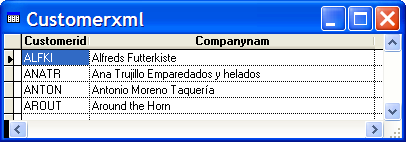
Finally, the collection of XMLTable objects is accessed. Since there is only one table contained in the XMLAdapter object, we can directly access the XMLTable. Lastly, the ToCursor method is called to convert the XML to a Visual FoxPro cursor. See Figure 1 for an example of the cursor created.
Converting Cursors to XML Using the XMLAdapter Class
Now that we have seen how easy it is to create Visual FoxPro cursors from XML, let's look at how easy the XMLAdapter class makes it to perform the reverse: creating an XML file from a cursor. The following example will select a set of records from the Employees table in the Northwind database that now ships with Visual FoxPro 8.0 and create an XML file from the cursor:
cFile = "c:\XMLAdapter\EmployeeXML.xml"
OPEN DATABASE (_samples+"\northwind\northwind")
SELECT employeeid, lastname ;
FROM Employees;
INTO CURSOR curEmployees
adapter = CREATEOBJECT("XMLAdapter")
adapter.AddTableSchema("curEmployees")
adapter.ToXML(cFile,,.T.)
Above, the name of the XML file is defined and the database is opened. The cursor is created to extract records from the Employees table and an instance of the XMLAdapter class is created. To add a cursor to the XMLAdapter object, the AddTableSchema method is called, passing in the name of the cursor. Finally, the ToXML method is called to create the XML file.
The first parameter is your desired file name for the XML file. The second parameter allows you to optionally specify an external schema file. In this example, the schema will be generated inside of the XML file, called an “inline schema”; therefore this parameter is skipped. The third parameter is passed as a ‘true’ to specify that the first parameter is a file name used to generate the XML in an external file instead of into a string.
Working with XML Schemas
XML Schemas are a standards-based format of the W3C (World Wide Web Consortium) for defining the structure of XML data. A schema is an XML document that defines the structure, constraints, data types, and relationships of the elements that constitute the data contained inside the XML document or in another XML document.
Schemas are written in a specialized syntax, and simply specify the elements and attributes that are allowed in a particular document. You can use schemas not only to define the valid elements and attributes of a document, but also to specify data types. Schemas can be included inside of the XML file and are called inline schema. Alternatively, they can be an external file which uses the XSD or XDR extension.
The XMLAdapter class supports hierarchical XML format which improves Visual FoxPro's ability to interoperate with XML produced from and written to Windows .NET DataSets.
Although in most cases you will not need to directly work with schemas, it is important to understand that they provide information about data types. As you will see further along in this article, sometimes the data types need to be altered while working with XML in Visual FoxPro. For more information about schemas, visit http://www.w3.org/XML/Schema.
The XMLAdapter class requires MSXML 4.0 SP1 as a minimum. MSXML 4.0 SP1 is installed with Visual FoxPro 8.0.
The XML Schema Object Model (SOM) is a rich API allowing you to create, edit, and validate schemas programmatically. SOM operates on schema documents analogously to the way Document Object Model (DOM) operates on XML documents. Working with the object model of the XMLAdapter class eliminates the need to work with the SOM directly, providing granular control when working with schemas.
Data types can be changed within the XMLFields collection prior to calling the XMLAdapter.ToCursor() method to generate a Visual FoxPro cursor. One instance of needing this kind of control would be where an XML file contains an element that stores a zipcode as a numeric, yet the cursor you generate needs the data as character type. Modify the data type using the following example code:
adapter = CREATEOBJECT("XMLAdapter")
cFile = "c:\XMLAdapter\EmployeeXML.xml"
adapter.LoadXML(cFile,.T.)
adapter.Tables(1).Fields(1).DataType = "C"
adapter.Tables(1).Fields(1).MaxLength = 10
adapter.Tables(1).ToCursor()
The XMLAdapter class allows you to create your own schema to manually customize an XML file. Additionally, you can use an XMLAdapter object to read the schema in order to understand the file structures of the contained data.
XMLAdapter Class with SQLXML
The XMLAdapter class supports SQL Server 2000 queries that output to XML using the SQLXML SDK (see sidebar, “The SQLXML SDK”). The following is an example of a T-SQL query that generates XML for the result set:
SELECT Customers.CustomerID,Customers.CompanyName,
    Orders.OrderID,Orders.OrderDate,
    Orders.ShipName,Order_details.ProductID,
    Order_details.UnitPrice,Order_details.Quantity
  FROM Customers
    Inner Join Orders
      On Customers.CustomerID = Orders.CustomerID
    Inner Join [Order Details] Order_details
      On Orders.OrderID = Order_details.OrderID
  WHERE Customers.CustomerID = 'CACTU' AND
    Orders.OrderID = 10521
  FOR XML AUTO, ELEMENTS, XMLDATA
The XML generated pulls data from three different tables and the XML data maintains the relationships between these tables. This allows an XMLAdapter object to maintain the parent-child relationships by populating the XMLTable.ParentTable and XMLTable.ChildTable properties. The following Visual FoxPro code uses the XML file in Figure 4 to display the relationships between the different XMLTable objects:
adapter = CREATEOBJECT("XMLAdapter")
cFile = "c:\XMLAdapter\SQLXML.xml"
adapter.LoadXML(cFile,.T.)
oTable1 = adapter.Tables(1)
oTable2 = oTable1.ChildTable
oTable3 = oTable2.ChildTable
oTable4 = oTable3.ChildTable
? oTable1.Alias  && Customers
? oTable2.Alias  && Orders
? oTable3.Alias  && Order_details
? oTable4  		 && .NULL.
oParent1 = oTable1.ParentTable
oParent2 = oTable2.ParentTable
oParent3 = oTable3.ParentTable
? oParent1		  && .NULL.
? oParent2.Alias  && Customers
? oParent3.Alias  && Orders
When the ToCursor() method is called, only one cursor (called Customers) will be generated, representing the join of all three tables. One note to keep in mind: The XML created above does not generate a schema which sets the maxlength for string fields. Therefore, Visual FoxPro will convert the data type to memos, since that is the default data type for unlimited string lengths. To work around this, you will need to modify the schema before calling the ToCursor() method. Here is the code:
oTable1.Fields(1).DataType = "C"
oTable1.Fields(1).MaxLength = 6
oTable1.Fields(2).DataType = "C"
oTable1.Fields(2).MaxLength = 40
oTable2.Fields(3).DataType = "C"
oTable2.Fields(3).MaxLength = 40
adapter.Tables(1).ToCursor()
A use for SQLXML is to publish SQL Server data for Intranet and Internet-based applications using the HTTP publishing functionality. The ability to publish data over HTTP allows you to build highly data-centric Web sites. In addition, the XMLAdapter class can retrieve data as XML by simply making an HTTP request. The request can be a select statement or a call to a XML template (see sidebar, “XML Templates”).
Working with Windows.NET Framework
In Microsoft .NET Framework classes, the primary class used for manipulation of data is the Windows .NET DataSet. The DataSet is a class that encapsulates data as XML. XML may be returned from DataSets in several ways:
Return the entire Windows .NET DataSet to the calling application, which returns all rows in DiffGram format with inline schema, having Updates, Inserts, and Deletes indicated.
Return Windows .NET DataSet changes only which returns only the rows that have been modified, added, or deleted in Diffgram format with inline schema.
Windows .NET DataSet class supports the DataSet.GetXml and GetXmlSchema methods which return XML to a .NET string type.
When working with Windows .NET DataSets, you must set the property MissingSchemaAction of the DataAdapter class prior to filling the DataSet
Windows .NET DataSet class supports the DataSet.WriteXml and WriteXmlSchema methods which write the DataSet as XML with Inline Schema, without Schema, or with Schema separately.
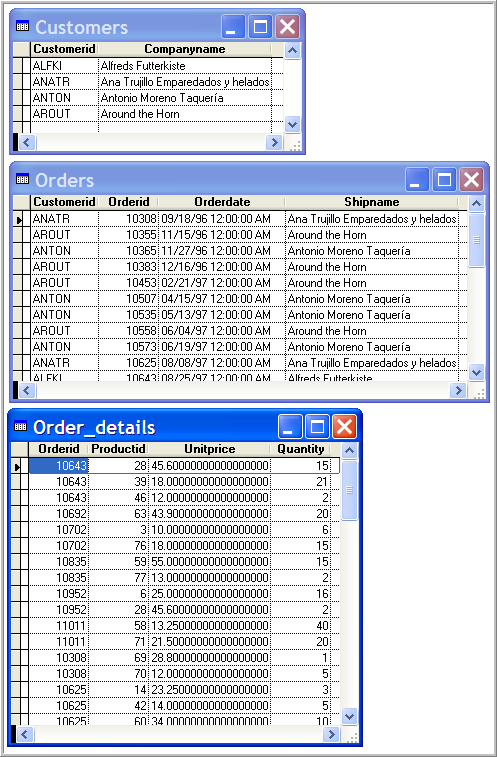
A great amount of focus went into making the XMLAdapter class compatible with Windows .NET DataSets. The XMLAdapter class supports hierarchical XML format, which improves Visual FoxPro's ability to interoperate with XML produced from and written to Windows .NET DataSets. Separate Visual FoxPro cursors will be created for each DataTable contained in the DataSet.
Listing 1 shows sample Visual Basic .NET code that retrieves data from three SQL Server tables into one Windows .NET DataSet, then exports the DataSet as XML to an XML file and the schema to a separate XSD file. One note worth mentioning when working with Windows .NET DataSets: You must set the property MissingSchemaAction of the DataAdapter class prior to filling the DataSet; like the following:
da_customers.MissingSchemaAction = _
       MissingSchemaAction.AddWithKey
This is required to include all length information in the schema. Otherwise, all the .NET Framework string fields will be modified to Memo fields in Visual FoxPro. This is because the memo field is the default type in Visual FoxPro for unlimited length strings.
The XMLAdapter class can consume this XML by reading in the data and generating three different cursors. Here is the code:
adapter = CREATEOBJECT("XMLAdapter")
cFile = "c:\XMLAdapter\DotNET.xml"
cXSDFile = "c:\XMLAdapter\DotNET.xsd"
adapter.XMLSchemaLocation = cXSDFile
adapter.LoadXML(cFile,.T.)
FOR EACH oXMLTable IN adapter.Tables
oXMLTable.ToCursor()
ENDFOR
Three different cursors will be created, as shown in Figure 2. The schema information for this example was created as an external file using Visual Basic .NET. When you have an external file, you need to set the XMLSchemaLocation property of the XMLAdapter object to the XSD file prior to reading in the XML.
One limitation of the XMLAdapter class when working with Windows .NET DataSets is that no relationships that are set in the DataSet are imported into the XMLAdapter class. You will need to set any relations between the generated cursors manually. The same is true when you export XML from the XMLAdapter that is to be imported into a Windows .NET DataSet. The relationships between the cursors are lost.
Working with Diffgrams
The XMLAdapter class supports Diffgrams, which provide an efficient way of transferring data back and forth between applications. Diffgrams are a special type of an XML document that are formatted to only include information for changed data, rather than the entire set of data. Using this format can reduce the size of the XML that needs to be sent between applications.
The developer loads the XML into Visual FoxPro, converts it to a cursor, makes the necessary updates to the data, and converts the data back to a XML document Diffgram. Only the changed data will be returned to the receiver of the XML. This XML document Diffgram can not only be used to apply to another XMLAdapter class in Visual FoxPro but also can be used in other applications that support data in Diffgram format. These XML formats are compatible with ADO.NET for use in Windows .NET Framework applications.
The Windows .NET DataSet is always serialized to XML in Diffgram format when the DataSet is returned to Visual FoxPro. The sample Visual Basic .NET code below returns a Windows .NET DataSet:
Return MyDataSet
If the DataSet contains changes, they will be flagged via the Diffgram:hasChanges=“modified” or Diffgram:hasChanges=“inserted” attributes. For “modified” records, the previous values will be in the diffgr:before section. Deleted records appear only in the diffgr:before section and not in the main section of the Diffgram. Either the entire Windows .NET DataSet (all the rows in the original query), or a DataSet that only contains changes, can be returned.
In the case where all rows are returned, unchanged rows will not have a diffgr:hasChanges attribute. To load the DataSet into an XMLAdapter object, you need to use the Attach() method instead of the LoadXML() method since the DataSet returns a XML DOM object. Here is sample Visual FoxPro code:
adapter = CREATEOBJECT("XMLAdapter")
* Call a .NET Web Service to return a DataSet
DataSetadapter.Attach(MyWebService.FetchData())
You can create XML in Diffgram format using the XMLAdapter class. This next example creates a read-write cursor that contains customer information from the new Northwind database (included with Visual FoxPro 8.0) and exports the changed record to a Diffgram XML file:
cFile = "c:\XMLAdapter\DiffgramXML.xml"
OPEN DATABASE (_samples+"\northwind\northwind")
SELECT CustomerID, CompanyName ;
FROM Customers;
INTO CURSOR curCustomers READWRITE
CURSORSETPROP("Buffering", 5)
LOCATE FOR CustomerID = "AROUT"
REPLACE CompanyName WITH "Around the Corner"
adapter = CREATEOBJECT("XMLAdapter")
adapter.AddTableSchema("curCustomers")
adapter.IsDiffgram = .T.
adapter.ToXML(cFile,,.T.,.T.,.T.)
Table buffering is turned on to allow the XMLAdapter object to detect the before and after values for the altered records. A record is then changed to replace the CompanyName field with a different string. The XMLAdapter object is instantiated and the cursor is added to the XMLTable collection. The property IsDiffgram is set to ‘true’ to allow the exported XML to be formatted for Diffgrams.
Finally, the ToXML() method is called to export the XMLTable to an XML file. Two new parameters are used in this example: The fourth parameter specifies whether to include the diffgr:before section in the Diffgram; and the fifth parameter specifies whether the XML should contain changes only.
Working with XML Web Services
An XML Web service is an application or block of executable code that is hosted on a web server and whose methods are exposed through standard XML protocols to be executed over HTTP. Those methods can be from any platform, from any language on either side. XML Web services are an industry standard for communicating between applications over the Intranet/Internet; and XML is the meta-language that serves as the backbone for these services.
As an example, you might use the XMLAdapter to retrieve data from a Windows .NET Framework application via an XML Web service. The Windows .NET Framework application fetches data using a Visual FoxPro COM object that uses the XMLAdapter class to prepare the data to export in XML Diffgram format. The data is then exposed to other applications, such as other Visual FoxPro applications, mobile devices, .NET Webforms, and .NET Winforms, by using an ASP.NET XML Web service to pass the data in the format of XML to the calling applications.
The Visual FoxPro application uses the XMLAdapter class to accept XML sent by the consumers of the XML Web service and updates the database with the changes. The ApplyDiffgram() method is called on the XMLTable object to apply the changes to the cursor, as named in the Alias property to which it applies. Shown below is the code that accepts an XML Diffgram file and updates the Customers table with the changes:
OPEN DATABASE (_samples+"\northwind\northwind")
cFile = "c:\XMLAdapter\DiffgramXML.xml"
adapter = CREATEOBJECT("XMLAdapter")
adapter.LoadXML(cFile,.T.)
adapter.Tables(1).Alias = "Customers"
USE Customers IN 0
adapter.Tables(1).ApplyDiffgram()
Working with the new CursorAdapter Class
Using the XMLAdapter class with the new CursorAdapter class provides more control over the XML data versus simply using the CursorAdapter alone. Data types can be changed prior to generating the XML or prior to filling cursors. If the XML file to be imported contains more than one table, the XMLAdapter creates different XMLTable objects.
The XMLAdapter class then offers flexibility as an XML source for CursorAdapter objects by allowing you to specify a valid XMLTable object as the argument for the CursorAdapter.SelectCmd property. The code below demonstrates using the CursorAdapter:
adapter = CREATEOBJECT("XMLAdapter")
cFile = "c:\XMLAdapter\CustomerXML.xml"
adapter.LoadXML(cFile,.T.)
MyCursorAdapter.SelectCmd="adapter.Tables(1)"
MyCursorAdapter.CursorFill()
If you are planning to use a CursorAdapter to communicate with an XML Web service via the Soap Toolkit in Visual FoxPro, you will need to use the XMLAdapter class to retrieve the XML from the XML Web service. Do this by using XMLAdapter.Attach() to retrieve a Windows .NET DataSet.
Summary
XML provides a universal way of describing, exchanging and moving data over the Intranet/Internet. It is platform-neutral. XML is a basis for Windows .NET technologies. The strategic value of Visual FoxPro 8.0 supporting and embracing XML is that it gives Visual FoxPro the capability to connect to other Visual FoxPro applications and Windows .NET applications, as well as other platforms or systems that support XML ? universally integrating business applications.
Listing 1: Sample .NET Code
Dim cConnStr As String = _
    "user id=sa;Initial Catalog=Northwind;Server=(local)"
Dim strSQL As String
Dim ds As New DataSet()

strSQL = "SELECT CustomerID, CompanyName " & _
         "FROM Customers " & _
         "WHERE CompanyName LIKE 'A%'"

Dim da_customers As New SqlDataAdapter(strSQL, cConnStr)

'Include all length information in this schema if a VFP client
'is consuming this data via an XMLAdapter otherwise all the client
'cursor fields will be memo fields. This is because the memo field
'is the default type in VFP for unlimited length strings.
da_customers.MissingSchemaAction = MissingSchemaAction.AddWithKey

da_customers.Fill(ds, "Customers")

strSQL = "SELECT Orders.CustomerID, Orders.OrderId, " & _
         "Orders.OrderDate, Orders.ShipName " & _
         "FROM Orders INNER JOIN Customers " & _
         "ON Orders.CustomerID = Customers.CustomerID " & _
         "WHERE Customers.CompanyName LIKE 'A%'"

Dim da_orders As _
  New SqlDataAdapter(strSQL, cConnStr)

'Include all length information in this schema if a VFP client
'is consuming this data via an XMLAdapter otherwise all the client
'cursor fields will be memo fields. This is because the memo field
'is the default type in VFP for unlimited length strings.
da_orders.MissingSchemaAction = MissingSchemaAction.AddWithKey

da_orders.Fill(ds, "Orders")

strSQL = "SELECT Order_details.OrderId, " & _
         "Order_details.ProductID, " & _
         "Order_details.UnitPrice, Order_details.Quantity " & _
         "FROM [Order Details] Order_details " & _
         "INNER JOIN Orders " & _
         "ON Order_details.OrderID = Orders.OrderId " & _
         "INNER JOIN Customers " & _
         "ON Orders.CustomerID = Customers.CustomerID " & _
         "WHERE Customers.CompanyName LIKE 'A%'"

Dim da_orders_details As _
  New SqlDataAdapter(strSQL, cConnStr)

'Include all length information in this schema if a VFP client
'is consuming this data via an XMLAdapter otherwise all the client
'cursor fields will be memo fields. This is because the memo field
'is the default type in VFP for unlimited length strings.
da_orders_details.MissingSchemaAction = _
    MissingSchemaAction.AddWithKey

da_orders_details.Fill(ds, "Order_Details")

Dim strFileXML As String = "c:\XMLAdapter\DotNET.xml"
Dim strFileXSD As String = "c:\XMLAdapter\DotNET.xsd"

ds.WriteXmlSchema(strFileXSD)
ds.WriteXml(strFileXML)
