


With Code Contracts, Microsoft delivers its own flavor of Design by Contract for the .NET Framework. But wait, what is this thing sometimes called Contract-First Development? How will it change the way you develop software and write your unit tests? And first and foremost, how do you use Code Contracts efficiently? In this article, I will introduce Design
by Contract and Code Contracts, as well as give you a sneak preview of Pex-Microsoft’s new test-suite generator. Along the way, I will show you how to add contracts to ADO.NET entities and some interesting coding strategies, good practices, and pitfalls you may encounter while making a deal with your code.
A little bit more than a year ago, Microsoft deployed DevLabs (http://msdn.microsoft.com/devlabs), a new MSDN portal. DevLabs can be seen as a spinoff of Microsoft Research (http://research.microsoft.com), which is dedicated to, as its name implies, research in computer science. While the latter mostly targets academics, scientists, and research groups, the DevLabs audience is the developer community who lives and breathes Microsoft technologies.
You’ll find at DevLabs some of the research projects, like Code Contracts and Pex, which are most likely to end up as released products. From there, you can download trials and experiment with new .NET features before they are released, and have a word to say about what you try: the portal is as much about being a front-end for innovations as about collaboration and discussion. Active forums let you give your feedback directly to Microsoft, discuss things you like, argue about things you don’t, request cleaner features, and report bugs.
Note that I used Code Contracts version 1.2.20518.12 and Pex version 0.15.40714.1 for this article and that its content reflects the design, features, and state of these products as of July 2009. My code samples require the AdventureWorksLT2008 (http://www.codeplex.com/MSFTDBProdSamples) database; they are in C#, but be assured that Code Contracts work with any .NET language.
Now that you know where to get all these nice tools, let’s start talking about contracts and what they are meant for.
Introduction to Contracts
Whenever you create a class, interface, method, or property, you have a target goal in mind; a purpose that must be fulfilled by that specific piece of code. Sometimes, if you’re careless, you’ll just throw out the implementation and expect it to be used in a certain way, uncaring of what would happen if someone else tries to call it in an unexpectedly weird fashion. If you’re wiser, you may document it using XML comments and perform some sort of validation or provide unit tests to make sure your code behaves and is used as you expect it. In fact, at the very least, you most certainly always check your method arguments and validate your object states as shown in Listing 1, right?
While these ad-hoc validations may help alleviate your worries, wouldn’t it be better if you could just assume that you can code against your objects, knowing for certain that whenever you use them they answer to a predetermined set of rules? And that if for any reason they break those rules, there are safeguards preventing them from being handled in ways they shouldn’t?
These are feats that the formalism of Design by Contract helps you achieve.
Design by Contract
Design by Contract (DbC) is a software engineering methodology which states that collaboration between two elements of a system must be managed by a set of clauses, which form a contract. The parties involved in such a contract are referred to as the supplier and the client. As a service provider, the supplier agrees to deliver some benefits to the client and must ensure that they will be consistent with what the latter expects. On the other side, the client also agrees to abide by a certain set of obligations, or requirements, so that the supplier can answer its request.
To help enforce a contract, which is always specified by the supplier, Design by Contract defines three sets of clauses known as:
- Preconditions
- Postconditions
- Invariants
A precondition specifies the obligations of the client, which apply on a method or property to validate its arguments or the required object states for its execution. A postcondition defines the benefits the supplier delivers to the client, and also applies to a method or property to validate its return values or the expected resulting object states. An invariant is a clause that must hold true at all times, for the lifetime of an instance. Whenever one of these clauses is violated, Design by Contract prescribes that the execution of the code should automatically result in an error.
By analogy with the Listing 1 code sample, if a service offers to send a consumer’s orders by e-mail, the client of the service has an obligation to provide the service with a valid consumer instance (method precondition); the e-mail service itself must make sure it contains an initialized SMTP server name at all times (class invariant). The service contract may also require the availability of a network (method precondition). When all these conditions are met, the service supplier then ensures the order’s delivery, which is the benefit the client expects (method postcondition). If one of these clauses fails, an exception shall be thrown.
Because of the complexity involved in a software program, you cannot express all of its parts as a series of contracts. Going back to my example, expressing the success of an e-mail delivery as a postcondition could be difficult. This is why contracts are also sometimes referred to as partial software specifications.
Besides describing the contract clauses, Design by Contract provides rules for contract inheritance and guidelines for error handling. It also stipulates that you can use contracts for software documentation and testing. As such, it promotes Contract-First Development, which implies that the first thing you should do when you write a new code element is to write its contract’s clauses-I’ll come back to this statement later, when I talk about Pex.
I’ll show you now how Microsoft implemented these principles in DevLabs’s Code Contracts.
Code Contracts Basics
Since Code Contracts comes with an extensive user manual, which is also available as a separate download at DevLabs, I won’t cover every single feature it has to offer. Instead, I will highlight the basics required for this article and move on quickly to talk about how to strategically integrate contracts into an application, here using ADO.NET entities.
The Code Contracts project is an offshoot of Spec# (http://research.microsoft.com/en-us/projects/specsharp). Spec# is a C# extension language that supports contract constructs directly in the programming language. In contrast, you write Code Contracts statements using classes from the Code Contracts Library, which is language agnostic. While not entirely deprecated, Spec# is being moved to CodePlex as an open-source research project (http://specsharp.codeplex.com); how much and in which direction it will continue to evolve is unknown.
You will find the classes of the Code Contracts Library in the System.Diagnostics.Contracts namespace.
You will find the classes of the Code Contracts Library in the System.Diagnostics.Contracts namespace. These classes will be shipped directly within mscorlib.dll in .NET 4.0, but if you are using Visual Studio 2008 or targeting .NET 3.5, you’ll need to manually add a reference to the Microsoft.Contracts Library assembly in order to use them.
The main class of the Code Contracts Library is the Contract class. As you may expect, Contract offers methods to validate preconditions, postconditions, and invariants. It also extends that support to assertions and assumptions, which I will explain very shortly. All these methods are static and accept the result of a Boolean expression as input.
You specify preconditions using the Requires set of methods. They must be the first statements of a method body and can enforce validation of arguments, properties, fields, or object states:
Contract.Requires<ArgumentNullException>(
  customer != null, "customer");

Contract.Requires(customer.CustomerID > 0,
  "Customer must be registered.");
Although postcondition statements validate the results of a method or other state upon method return, they must appear immediately after the preconditions. I will cover how they kick in at the end of a method execution when I talk about the Contract Rewriter and the Static Contract Verifier. You declare them using the Ensures method:
Contract.Ensures(
  Contract.Result<bool>() == HasErrors);
Note the call to Contract.Result<bool**>().** This is how you refer to your method return value and how you use it in postcondition expressions. The code snippet simply states that it expects the return value of a method to be a bool whose value equals that of the HasErrors property.
The Requires and Ensures methods come with a few other special constructs; I encourage you to read the Code Contracts documentation to learn more about them.
Invariant statements are a bit different; you need to put them in a dedicated method and flag it with the ContractInvariantMethod attribute. The method name can be anything, but ObjectInvariant is the proposed standard for it:
[ContractInvariantMethod]
protected void ObjectInvariant()
{
  Contract.Invariant(
    !string.IsNullOrEmpty(this.SmtpServerName),
    "SMTP server name not initialized.");
}
In Design by Contract, invariants are meant to be true at all times. Currently, Code Contracts minimizes invariant evaluations so that they are taken into account only when you invoke a public method (that includes constructors) or a property setter. Otherwise, they are ignored. This is a feature you should be aware of if you choose to add invariants to your classes.
The Code Contracts Library also introduces support for assertions with the Assert method. You can use this method to validate a condition that should be true at a specific place in your code, for instance if you couldn’t or chose not to check it with the Requires or Ensures methods:
Contract.Assert(
  NetworkInterface.GetIsNetworkAvailable(),
  "Network is not available.");
Alongside assertions come assumptions. They work like assertions, but you can declare them to help the Static Contract Verifier understand your code (more on this tool soon). The method to use is Assume:
Contract.Assume(
  NetworkInterface.GetIsNetworkAvailable(),
  "Network is not available.");
At your option, when a contract clause fails, either an assertion occurs or a ContractException is thrown. ContractException gets generated in your assembly as private, and you must handle the more generic type Exception if you want to catch contract violations. Fortunately, you can customize the run-time contract error-handling behavior, as I will show later. Here is a sample exception message for a failed invariant:
Invariant failed:
!string.IsNullOrEmpty(this.SmtpServerName)
SMTP server name not initialized.
Listing 2 presents a contract version of the common validations presented in Listing 1. Code Contracts also has support for using quantifiers over IEnumerable<> objects, for declaring inheritable contracts on interfaces and abstract classes, and for a few other features as well.
Behind the Scenes
OK, I said I would speedily get to the Entity Framework examples. I lied. I must first explain how Code Contracts works.
The Code Contracts Library is but one of the tools you need in order to use contracts in .NET. The library in itself does nothing; if you try to execute code containing contract statements, either nothing will happen or you’ll get assertion failures. This is because the library simply prepares your code for further manipulations by the other Code Contracts tools.
Alongside the Code Contracts Library come a Contract Rewriter, whose job is to inject the run-time contract checks into your assembly, and a Static Contract Verifier, which analyzes your assembly and can detect contract violations at compile time.
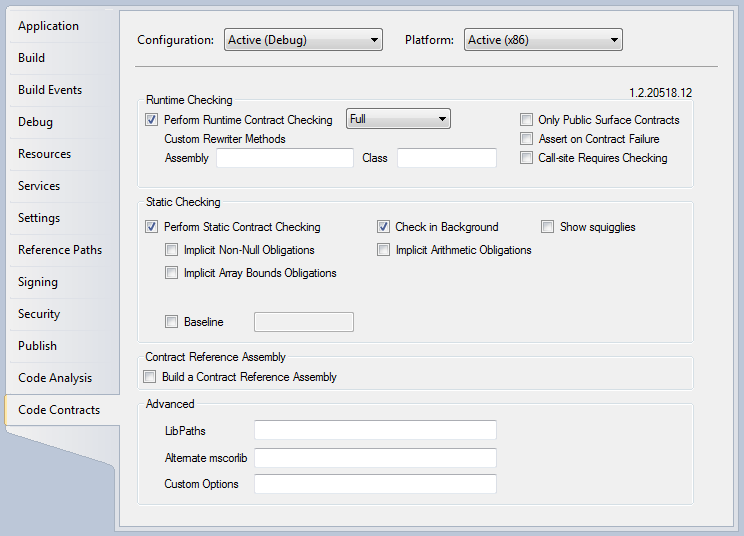
Although you can run these tools individually on .NET assemblies, Microsoft has also integrated them in the build process of Visual Studio, where you’ll discover a new property pane for Code Contracts settings in your project properties, as shown in Figure 1. You must enable either Runtime Checking, Static Checking, or both in order to have your contracts kick-in.
Runtime Checking
The Contract Rewriter (ccrewrite.exe), also known as the Binary Rewriter, activates runtime checking by taking your compiled assembly and rewriting its MSIL so that the contracts stipulated by your clauses get evaluated at run time. The injected MSIL is not limited to method calls and contains the equivalent of full program statements.
The best way to understand how, and in which order, an application really evaluates contract clauses is to have a good look at a rewritten method. By using the free version of Red Gate .NET Reflector (http://www.red-gate.com/products/reflector) and the SendOrdersWithContract method introduced in Listing 2, Listing 3 illustrates what becomes of the code after the Contract Rewriter tampers with the MSIL. The reflection output is not entirely valid C#, but that will do for this demonstration. I don’t show the rewritten ObjectInvariant method for conciseness.
As you can see, the Contract Rewriter generated quite a lot of code to resolve the original contract clauses. Note the new position of the postcondition section and the call to the ObjectInvariant method that the Contract Rewriter inserted near the end. Having these statements there makes more sense than when they were at the beginning of the method or in a separate method.
Runtime checking comes with a few options that I will not cover here. However, there’s one thing I haven’t mentioned about the contract clauses that is worth highlighting: Code Contracts flags the Requires, Ensures, Invariant, Assert, and Assume methods with the Conditional attribute and requires specific conditional compilation symbols for the Contract Rewriter to activate them. Basically, you can disable contracts entirely, enable preconditions only, enable preconditions and postconditions, or even include invariants, assertions, and assumptions. You do this customization by changing the value of the drop-down list you see displaying Full in Figure 1. The user manual has all the details about the run-time checking levels and their associated contract clauses.
Static Checking
Static checking is very different than runtime checking: you don’t even need to run your application to validate your contracts!
When you enable static checking, the Static Contract Verifier (cccheck.exe), also known as the Static Checker, performs contract coverage of your assembly, a task akin to code coverage. The Static Contract Verifier takes your contract definitions, analyzes the MSIL, and examines the numerous execution paths, trying to prove that it can successfully validate all the contracts you have defined. When it detects what it thinks is a contract violation, it will alert you in Visual Studio Error List and Output windows.
Doing static checking can be quite an endeavor. The Static Contract Verifier is much more sensitive than the Contract Rewriter. Also, since it doesn’t run your application, it can’t always understand what your code is doing. You must then help it by using Assume clauses to tell it that yes, a given condition is verified.
I have found that static checking is sometimes incapable of proving contracts accepted by runtime checking. It is often because the Contract Rewriter accepts statements using methods and properties with undetermined or partial contract specifications, while the Static Contract Verifier doesn’t. In the end, instead of downgrading my contract clauses to satisfy static checking or filling my code with assumptions, I applied the following attribute to my assemblies:
[assembly: ContractVerification(false)]
Using the ContractVerification attribute with a value of false indicated to the Static Contract Verifier that static checking is globally disabled. After that, I used the same attribute with a value of true on specific methods for which I really want static checking enabled. That greatly reduced my headaches.
The following output shows the results of running static checking on an assembly containing, among others, the four methods presented in Listing 4:
Run static contract analysis.

Suggested precondition:
  Contract.Requires(s.Length > 10);

Validated: 33,3%
Total methods analyzed 3
Total time 3.917sec. 1305ms/method

ensures is false:
  Expected static checking postcondition failure.
  + location related to previous warning
assert unproven

Checked 3 assertions: 1 correct 1 unknown 1 false

Static contract analysis done.
By looking at the results, you can see that the Static Contract Verifier only analyzed three methods. This is because I did not mark the IgnoredRequires method with the ContractVerification attribute, so the Static Contract Verifier ignored it, like other unmarked methods in the assembly. IgnoredRequires would otherwise have been unproven because of the Requires check in the DoChecking method. The postcondition in the InvalidEnsures method was proven to be always false. Also, because there is no Requires contract on the length of the string parameter in DoChecking, the assertion there was unproven. The last method, ValidEnsures, was proven correct because I used an assumption to inform the Static Contract Verifier that it can consider that the condition in the postcondition is always satisfied.
That’s a small example to start with, but it gives you an idea of what static checking can do. For the remainder of the article, I will take full advantage of runtime checking and ignore static checking.
Add Contracts to Your Entities
As promised at last, I will now explain how to add contracts to model-generated ADO.NET entities. The goals of this demonstration are not only to show you how to define real-world contracts for the Entity Framework, but also to present advanced integration techniques and strategies made possible by the design of Code Contracts. You will see how powerful contract injection can get and why Code Contracts is not just shipped as a simple class library.
You can even add contracts to third-party assemblies.
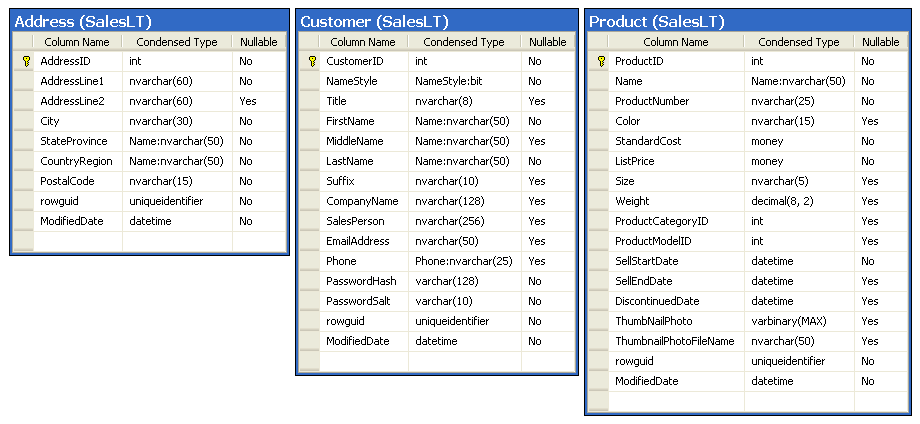
For the purpose of this exercise, I will add contracts to Customer, Address, and Product entities generated from the AdventureWorksLT2008 database. As you’ll discover, you have some options before you to do that. The choice of the technique to use depends on the type of contract you need and of the availability of the entities source code. As I’ll demonstrate, you can even add contracts to third-party assemblies, within certain limits. Figure 2 shows the related table schemas of the entities, which I’ll use as a reference to define matching contract clauses.
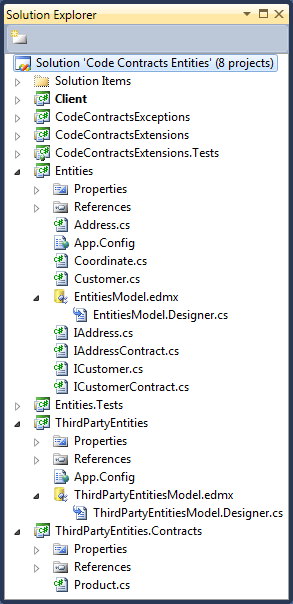
The Visual Studio companion solution for this article consists of a few C# projects, and is presented in Figure 3. The Client project is a console application with full runtime checking enabled. You can run it to see the numerous samples presented here in action. I will cover the other projects in the next sections.
Before starting, please note that you can apply the strategies I’ll be unveiling to any type of project. They are not restricted to ADO.NET entities or the Entity Framework.
Code Contracts Conditions
I’ve been enforcing preconditions in my everyday programming for years, either with homemade class libraries or existing frameworks, such as the Enterprise Library Validation Application Block (VAB) (http://entlib.codeplex.com). Some time ago, as part of the Enterprise Library Contrib project (http://entlibcontrib.codeplex.com), I provided an ArgumentValidation class, which enables you to validate method arguments using the VAB validators without the burden of the Policy Injection Application Block Validation Call Handler:
ArgumentValidation.Validate(
  "arrayIndex", arrayIndex,
  new RangeValidator(0, 9));
What I like about the VAB validators is that they look nice; just by seeing their names you understand what your code is doing. Besides that, they centralize comparison logic in one single unit of work.
With the Code Contracts Library, the previous statement would look like this:
Contract.Requires(arrayIndex >= 0 &&
                  arrayIndex <= 9);
One of the first things I thought of when I started using Code Contracts was: Wouldn’t it be cool if the Code Contracts Library had something to make my conditions look as nice as the VAB validators? What about some helpers to make the code more readable?
So, here come the Code Contracts Conditions. They’re a small bunch of extension methods I created to provide centralized comparison logic for the contract clauses. The Conditions are available as part of the Code Contracts Extensions project on CodePlex (http://ccextensions.codeplex.com). Each of these methods is flagged with the Pure attribute, a Code Contracts attribute which indicates that the callee has no visible side-effect from the caller point of view:
[Pure]
public static bool IsInRange<T>(
  this T value, T lowerBound, T upperBound)
  where T : IComparable<T>
{
  Contract.Requires(!value.IsNull());

  return value.CompareTo(lowerBound) >= 0 &&
         value.CompareTo(upperBound) <= 0;
}
Because extension methods are static, you can invoke them as extensions or call them directly:
Contract.Requires(arrayIndex.IsInRange(0, 9));
Contract.Requires(
  Condition.IsInRange(arrayIndex, 0, 9));
Feel free to visit CodePlex and propose your own extensions. The followings are some more examples of the Conditions in action:
Contract.Requires(!customer.IsNull());
Contract.Requires(!collection.IsNullOrEmpty());
Contract.Requires(value.IsMatch("^[a-z]*$"));
Contract.Requires(Contract.ForAll(
  positiveNumbers,
  (int number) => number.IsGreaterThan(0)));
I don’t recommend using the Code Contracts Conditions with static checking. Although you can have the Static Contract Verifier understand some of the Conditions by providing the Ensures method to describe the return values, in general it lacks, for now, the ability to evaluate methods with undeterminable or complex contracts (such as Regex::IsMatch). Again, I choose to take full advantage of runtime checking versus static checking.
Since I’ll be using the Code Contracts Conditions while adding contract clauses to the ADO.NET entities, I included the CodeContractsExtensions project directly in the Visual Studio companion solution for the article, where it’s referenced by those of the other projects that need it.
Interface Preconditions and Postconditions
The C# project Entities in Figure 3 contains an ADO.NET Entity Data Model which was used to generate the Customer and Address entities in the EntitiesModel.Designer.cs file:
public partial class Customer : EntityObject //...
public partial class Address : EntityObject //...
I’ll start with the Customer entity. It comes with a bunch of properties like FirstName, LastName, Phone, and others that match the Customer table schema introduced in Figure 2. What you want to do is to add contracts to these properties and make sure that the value for each property behaves accordingly to the schema.
You could directly edit the generated code and insert your clauses there, but this is a very bad practice, as any regeneration of the Customer class from the model would erase all your changes. There’s a better way: Since Customer is a partial class, you can extend it in a separate file.
But how can you extend properties in one file if the code of these properties is in another file? The magic comes from the Contract Rewriter. Remember that it injects contracts in your assemblies after compilation. I also mentioned earlier that contracts can be inherited. All you have to do is to figure out a way to tell the Contract Rewriter that your Customer properties inherit the contracts you want them to enforce.
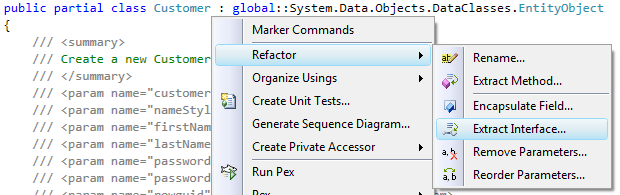
The solution turns out to be pretty simple: you’ll add to the Customer class an interface whose signature matches that of the Customer properties. Figure 4 demonstrates that by using the refactoring features of Visual Studio, you can select the Customer class and, thru the context menu, extract its interface. This way, you can create the ICustomer interface.
After that, you augment ICustomer with a special Code Contracts attribute, ContractClass. Then define a dedicated contract class for ICustomer, ICustomerContract, which you also decorate with an attribute, ContractClassFor. What is left to do is to have the ICustomerContract class inherit from the ICustomer interface and implement the interface explicitly. It is in that implementation that you can define your contracts for the ICustomer interface. Note that interface contracts are always provided by a concrete class.
Listing 5 presents the ICustomer interface, the ICustomerContract class, and a sample contract for the Phone property. As you can see, you can specify contracts to match the database schema requirements as well as strengthen them-here by refusing a null value and adding a regular expression that must be matched by the phone number.
To make the Customer class inherit your contracts, you simply indicate that it implements the ICustomer interface by using a separate Customer.cs file:
public partial class Customer : ICustomer
{
}
When the Contract Rewriter runs over the Entities assembly, it will automatically inject the contracts from the ICustomer interface into Customer’s properties. Since the rewriting occurs at the assembly level, your entity generated-code is left untouched.
As an example of the benefits you get from using Code Contracts, any attempt to make an invalid Phone assignment will now immediately trigger a contract failure:
Customer customer = new Customer();
customer.Phone = "0123xyz";
/* Precondition failed: value.IsMatch(@"^(\d{3}-
\d{3}-?\d{4}|1 \(\d{2}\) \d{3} \d{3}-\d{4})$") */
LINQ to Entities
If you use Linq to Entities, you can benefit from having contracts in place. However, keep in mind that you must manipulate the strongly typed entities containing the contract clauses:
Entities entities = new Entities();
IQueryable<Customer> customers =
  (from customer
   in entities.Customer
   select customer).Take(5);

foreach (Customer customer in customers)
  Console.WriteLine("{0}: {1}",
    customer.FirstName, customer.EmailAddress);
This means that if you create anonymous types, you must first convert them to full-blown entities to take advantage of your contracts, as shown in Listing 6. Remember that only the corresponding fields in the strongly typed entities are initialized. If you try to access uninitialized ones, you may trigger contract failures depending of the nature of your contract clauses.
Third-party Contract Reference Assembly
Previously, you altered the Customer partial class. Sometimes, you may not have access to your entity’s source code. One very cool feature of Code Contracts is that you can create contracts for assemblies even if you don’t have their source code.
The ThirdPartyEntities project of the companion solution contains an ADO.NET Entity Model that defines a Product entity. For the purpose of this demonstration, pretend that the project comes from a third party and that you can’t modify it. Instead of using a project reference when you need it, you’ll use a direct assembly reference.
So, how can you add contracts to the Product entity contained in the ThirdPartyEntities project without modifying it? The first thing to do is to create another project whose output assembly bears the same name (that is, ThirdPartyEntities). This is what I’ve done with the ThirdPartyEntities.Contracts project. Then, in its Code Contracts property pane (Figure 1), you must check the Build a Contract Reference Assembly option.
After that, you define the same Product class in the ThirdPartyEntities.Contracts project. The difference is that the implementation of the class will only contain the contract clauses you want to apply to the Product class. Listing 7 shows what this skinny Product class looks like.
When you compile the ThirdPartyEntities.Contracts project, it will create the ThirdPartyEntities.dll and ThirdPartyEntities.Contracts.dll assemblies. This latter assembly contains the contracts you have defined for the Product entity. To use it in the Client application, don’t reference the assembly; instead, go to the Client project’s Code Contracts property pane (Figure 1) and add the path to ThirdPartyEntities.Contracts.dll in the LibPaths box:
..\..\..\ThirdPartyEntities.Contracts\bin\Debug
To make your Requires method kick-in in the Client project, you also must check the Call-site Requires Checking option.
When you build the Client project, the Contract Rewriter will pick up ThirdPartyEntities.Contracts and do its magic with the Product entity. But be warned! There are important differences between using a contract reference assembly in that fashion and implementing contracts directly in your entities. First, the Contract Rewriter creates proxies for the Product methods and properties; it doesn’t inject the contracts into the Product class itself. Calls from the Client application to the Product entity will use these proxies, which contain the contracts, when calling the original methods and properties. Also, keep in mind that since the third-party assembly isn’t instrumented with contracts, any internal calls it makes won’t benefit from your contracts.
Furthermore:
- Only the Requires method is enforced by proxies.
- If you derive a type from a third-party assembly class or interface, it will inherit contracts from a contract-reference assembly only for methods and properties it overrides.
- Invariants are not inherited.
- On the bright side, if you look again at Listing 7, you’ll see that I’ve done something that I couldn’t have done by using an interface while working with the Customer entity: provide a contract for a static method.
In the end, building a contract reference assembly is powerful, but it has its limitations. If you are curious about this feature, explore the standard Microsoft .NET contract assemblies that ship with Code Contracts; this is the implicit way you use them.
Advanced Concepts
Now I’ll introduce advanced programming techniques. You don’t have to master these concepts in order to use Code Contracts, but if you want to take them to another level and improve your software development skills, don’t overlook this section.
Object Validation
As a supplier, the Customer entity now implements contracts for its properties and any client will benefits from and be forced to abide by the rules you have set. Now what? Should you be content with that? Not yet. How can a client of the Customer entity knows that it can safely start using an instance of the class? All you have provided are safeguards against misuses of the entity properties. Because an ADO.NET entity must supply a parameterless constructor, nothing prevents an instance of Customer to be created and passed around without having its properties properly initialized. Sure, a contract violation will be detected at some point, but not necessarily at the best of times. Now that you have contracts in place, however, you can do better: you can provide an implicit overall contract stating that a Customer instance is valid as a whole.
The idea is not a new one. Again, I bring an Enterprise Library concept to Code Contracts. The Validation Application Block comes with an ObjectValidator whose purpose is to validate the instance of a class based on validation attributes applied to its properties or fields. If all specified validations are satisfied, an object is said to be valid. Now, you don’t need the VAB anymore, you’ve got contracts!
You could think first of using invariants to make sure that an object is in a valid state, but since invariants apply at all times, even on parameterless constructors, they’re not the best fit for a solution. Also, they don’t apply on property getters. Furthermore, you wouldn’t want to specify invariants to validate all Customer properties, since the properties themselves already provide their contracts.
To introduce in Code Contracts the concept of object validation in an Enterprise Library-like fashion, you have to agree to this principle: If all the properties of an object have valid contracts, then the instance itself is considered in a valid state. To enforce that, you simply have to invoke all the getters to trigger the validation of their contract clauses.
I provide the object validation feature for Code Contracts with the extension method IsValid, which you can use to validate an instance anywhere in your code, including as part of a contract clause. The IsValid method works with the ContractValidation attribute, which you can apply to a class, interface, or property. When you use the ContractValidation attribute on a class or interface, the IsValid method verifies all the properties of that class or interface. When not set to such a level, you can apply the ContractValidation attribute to specific properties to limit validation to those properties. Furthermore, the IsValid method also processes non-public properties.
Thus, to make the Customer entity support object validation, you just add the ContractValidation attribute to the ICustomer interface of Listing 5:
[ContractValidation]
[ContractClass(typeof(ICustomerContract))]
public interface ICustomer
Now, whenever a client invokes the IsValid method on a Customer instance, each contract clause in the getters of the ICustomer entity properties will be checked. The IsValid method will return true only if all contracts are verified successfully:
Contract.Requires(customer.IsValid());
When a contract clause using the IsValid method fails, you don’t get the information about which property is in error, but you can take advantage of the debugger and explore your object properties to find out, as shown in Figure 5.

As an alternative, you can call the method ContractValidationAttribute.Validate, which coldly throws a ContractValidationException if a contract clause is violated. This exception exposes a PropertyInfo instance describing the property that failed.
As you can presume, the IsValid method indirectly uses reflection and its evaluation can be a costly operation. Choose wisely the places in your code where you invoke it. Note also that the validations work only if you’ve set the contract run-time behavior to throw exceptions on contract failures.
You’ll find the IsValid method, the ContractValidation attribute and ContractValidationException as part of the Code Contracts Extensions project on CodePlex.
Self Validation
The Enterprise Library Validation Application Block also has the concept of self validating objects, whereas one class can supply a method whose role is to validate an instance state. Although the Code Contracts Extensions don’t provide anything specific for that feature, you can implement self validation by extending the object validation technique presented in the previous section and using a dedicated property to do your validations:
[ContractValidation]
private bool SelfValidates
{
  get
  {
    Contract.Requires(
      !this._FirstName.IsNullOrEmpty());

    Contract.Requires(
      !this._LastName.IsNullOrEmpty());

    return true;
  }
}
Only apply the ContractValidation attribute to your property if you want self validation to be evaluated in the IsValid method calls alongside other object validations. Otherwise, invoke the self validation property directly.
Lazy Initialization
Sometimes, having strong contracts can become a burden. When you define very strict clauses in an entity, you may trigger exceptions when you don’t want to.
Let’s say you have the following contract for the Address entity, which ensures it’s never null and is within a given length:
string IAddress.CountryRegion
{
  get
  {
    Contract.Ensures(
      !Contract.Result<string>().IsNull() &&
      Contract.Result<string>().Length.IsInRange(
      1, 50));
    return default(string);
  }
  // Setter skipped
}
Then, assume that you’re getting an Address instance from a simple factory (which doesn’t set any property value):
public class AddressFactory
{
  public static Address GetNewAddress()
  {
    Contract.Ensures(
     !Contract.Result<Address>().IsNull());
    return new Address();
  }
}
You now need to initialize the Address properties, but may have to perform some logic on them to do that. In the code snippet below, I check the value of the CountryRegion property before initializing it, but because its getter contract states that its return value can’t be null-and that its value is effectively null (not initialized by the factory), I’ll get a contract exception when calling the getter:
Address address = AddressFactory.GetNewAddress();
if (address.CountryRegion == null) // Throws
  address.CountryRegion = GetCountry(address);
This is a situation where you perform lazy initialization (or delayed construction) of your object. This scenario occurs frequently when you have a default parameterless constructor or when proper initialization is not enforced by a constructor. This is the case here with an ADO.NET entity, but the same issue could also arise with an Inversion of Control Container or Data Transfer Objects exposed by Web Services, among others.
To fix the problem, you need some kind of lazy contract evaluation. You want the CountryRegion getter contract to be effective, but not while you’re initializing your Address entity. The solution comes in two parts: managing the initialization state and defining better contracts.
In order to manage the initialization, you can use the IInitializable interface. This interface defines a single property, IsInitialized. The contract for the IsInitialized property stipulates that once you set the property to true, the implementing object must have a valid state. So, it makes sure that you can’t set an object as initialized if it’s not properly constructed. Listing 8 presents IInitializable and its contract. Naturally, since the object validation technique is used here with a call to the IsValid method, the implementing class must support it.
Now that you have the IInitializable interface, you can use its IsInitialized property value in other contracts to implement laziness. If you go back to the CountryRegion getter presented earlier, you can rewrite it like this:
string IAddress.CountryRegion
{
  get
  {
    Contract.Ensures(
      // Laziness
      (this is IInitializable &&
       !((IInitializable)this).IsInitialized) ||
      // Contract
      (!Contract.Result<string>().IsNull() &&
       Contract.Result<string>().Length.
         IsInRange(1, 50)));

    return default(string);
  }
  // Setter skipped
}
The first part of the statement checks if the Address object is initialized; if not, it doesn’t enforce the contract clauses. However, if the Address is set as initialized, the contract kicks-in.
Invariants can also benefit from laziness; they just have to check the IsInitialized property before deciding whether to apply their contract. Invariants are automatically validated when you set the value of the IsInitialized property to true, because they are injected in the setters by the Contract Rewriter. Listing 9 shows the Address entity with full lazy contract evaluation. You can now perform lazy initialization without a problem:
Address address = AddressFactory.GetNewAddress();
if (address.CountryRegion == null) // Safe
  address.CountryRegion = GetCountry(address);
// Other initiatizations skipped...
address.IsInitialized = true; // Auto-validated
You may have noticed earlier on that the Ensures clause in the new CountryRegion getter contract verifies with the is operator that the current instance (this) implements IInitializable. This is a very powerful condition to add to your lazy contracts. IAddress and IInitializable are two distinct interfaces; you have no guarantee whatsoever that an Address class would implement both. By adding the is statement check, laziness is only enabled in the postcondition if the implementing class also implements IInitializable. Otherwise, the contract clause behaves exactly like the strong one introduced at the beginning of this section. If you download the companion code of this article, see how the Address contract behavior changes just by removing IInitializable from the list of interfaces it implements!
Note that IInitializable and its contract are also among the things you’ll get from the Code Contracts Extensions project on CodePlex.
Error Handling
The importance of an adequate error handling mechanism in a software system is often underestimated. The Code Contracts team has worked hard to provide you with many interception points to manage contract violations.
The first thing to understand is that, while Code Contracts supports exceptions, the overall design of the run-time error handling subsystem is not necessarily exception-based. It instead allows any type of error management you deem appropriate.
Another thing to note about throwing exceptions is that while Requires<> gives you the ability to throw a specific exception, it only allows you to specify a string message for it. If your exception needs additional arguments, you must resort to what is called legacy requires, which use the old if/throw pattern. Such code behaves similarly to Requires**<>,** but provides better exception support:
void SampleLegacyRequires(Customer customer)
{
  if (!customer.IsValid())
    throw new CustomerException(customer);
  Contract.EndContractBlock();

  // Implementation skipped...
}
While that feature is available to emulate Requires, it isn’t available for Ensures and the other contract clauses.
You can also alter the default run-time contract behavior by defining a class implementing specific handlers. Listing 10 presents the CustomContractsRuntime class, which I created to illustrate error handling customization. CustomContractsRuntime mostly simulates the default run-time contract behavior. Notice the TriggerFailure method: this is where you specify how errors should be handled.
Remember the code injection of the Contract Rewriter introduced in Listing 3? Take a good look at it again and you’ll see that it involves __ContractsRuntime and CustomContractsRuntime calls. This is because the Contract Rewriter injected calls to my custom run-time contract behavior class. I enabled this by configuring the Custom Rewriter Methods in the Code Contracts property panel (Figure 1). For the Assembly I specified CodeContractsExceptions and for the Class I specified CoDeMagazine.CodeContracts.CustomContractsRuntime.
Be aware that you must specify the run-time contract behavior in all the projects you want to customize: keep in mind that this alters the way the target assembly is rewritten and that these specialized methods are not global handlers. In the companion solution, I configured the custom behavior only for the Client application; the other projects still throw standard ContractException exceptions.
When I first experimented with run-time contract behavior, I was a bit puzzled by the fact that there are differences in the methods called by the contracts clauses. To help you demystify their workflow, I present it in Figure 6.
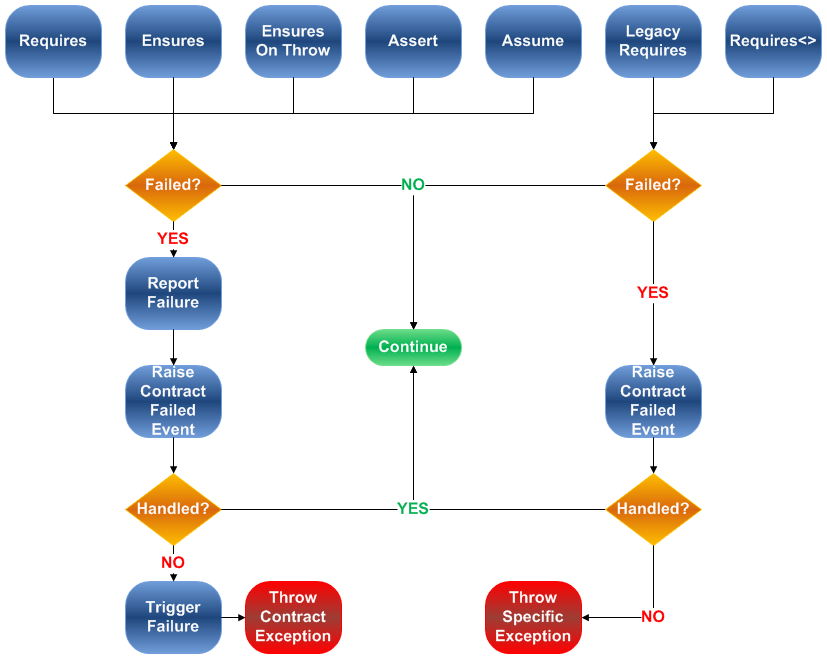
Run-time contract checking also provides a global event, Contract.ContractFailed, which is raised when contracts are violated. That event is system-wide and works across assemblies. This is the preferred way of intercepting contract clause errors in your application:
Contract.ContractFailed += (sender, e) =>
  Console.WriteLine(e.Message);
The ContractFailed event argument is ContractFailedEventArgs. You can use it in your handler to mark the error as handled and continue with the normal execution path by calling the SetHandled method, or to force the triggering of the failure after all handlers have executed by invoking the SetUnwind method.
Although ContractFailedEventArgs contains information about the state and nature of the current error, it doesn’t provide you with the exceptions raised by a legacy requires or Requires**<>,** because those exceptions aren’t thrown yet when the ContractFailed event fires.
Multithreading
I wouldn’t be objective if I didn’t highlight one of the major issues with Code Contracts. Multithreading is currently not supported. In fact, using Code Contracts run-time checking with multithreading can be downright dangerous sometimes.
Let’s say that you have a critical section managed with a lock or another synchronization mechanism:
public class MultithreadedList<T> : IList<T>
{
  List<T> list = new List<T>();

  public void Add(T item)
  {
    lock (list)
    {
      list.Add(item);
    }
  }
  // Code skipped...
}
You’ve seen by now that interface contracts are inherited and injected. Listing 11 shows the same method after contract injection by the Contract Rewriter. You can see that the postcondition was added after the lock. If another thread empties the list between the lock and the Ensures statement, the clause will fail. In fact, the postcondition should have been injected inside the lock (or not at all) to prevent contract injection from breaking valid code. Having the Contract Rewriter guess where to add the contract clauses in such a context is almost impossible; imagine a multiple-lock method!
The Code Contracts team will provide a way to manage or workaround multithreading in a future release.
Explore Your Entities with Pex
I couldn’t talk about Code Contracts without saying at least a few words on Pex. Pex stands for Program EXploration. This tool drills down into your assemblies, gathers information, and analyzes it in order to provide you with white-box testing.
While covering Pex is beyond the scope of this article, I’ll show you rapidly how it can generate unit tests based on Code Contracts clauses.
Running Pex
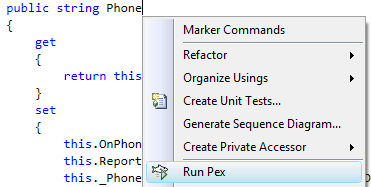
Once you’ve installed Pex and you have opened a project for which you’d like to generate unit tests, all you have to do is to use the context menu in Visual Studio to invoke it, as shown in Figure 7. If you open the context menu inside a property or method, Pex will only explore that specific piece of code; otherwise, it will apply the exploration to the entire project.
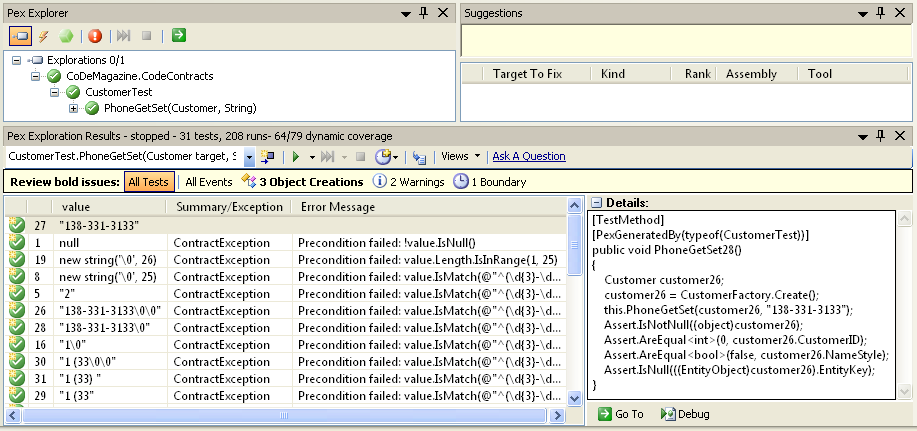
Now, be patient! Exploring an assembly can be a lengthy operation. But it’s worth every second of it. When combined with Code Contracts, Pex detects your contract clauses and generates a bunch of tests to stress them. I was curious to see how Pex would behave with the Code Contracts Conditions and with regular expressions, so I challenged it with the Phone property contract already introduced in Listing 5. After tweaking the test project a little bit, I successfully got Pex to generate a valid phone number and quite a lot of unhappy paths to test the property. Figure 8 shows the Pex Exploration Results from this operation.
Pex won’t create all your unit tests, but it can save you a lot of time!
The test projects included in the companion solution presented in Figure 3 are all Pex-generated. Pex won’t create all your unit tests, but it can save you a lot of time!
Contract-First Development and TDD
Let me come back to one of the principles of Design by Contract: design your contracts first. Ouch! That’s quite a blow for Test Driven Development (TDD), which states that you must design your tests first, isn’t it? Maybe not. Maybe both worlds can agree on a truce and find peace by collaborating.
You’ve seen how running a tool like Pex can really help you by generating many of your unit tests. So there’s definitely a paradigm shift here. However, that doesn’t mean the end of TDD either, because not all unit tests can be generated. Furthermore, you can’t write contracts without an API.
So, why not use TDD and start writing your happy path unit test? Then, when you create a new method or property to satisfy your test, switch to DbC. Define your contracts and generate unit tests for them with Pex. After that, switch back to TDD and complete your implementation. You can even go back and forth between both methodologies while refactoring you API before running Pex.
That’s Nirvana.
Conclusion
In this article, I presented an overview of Design by Contract and introduced the Code Contracts Library, the Contract Rewriter, the Static Contract Verifier, and Pex. Along the way, I showed how you can apply these principles and tools to the ADO.NET entities of the Entity Framework. I covered advanced strategies and techniques you can use while implementing your contracts, such as the Code Contracts Conditions, object validation, self validation, lazy initialization, and error handling. I also highlighted some limitations you may encounter.
It’s up to you now to dig deeper into these topics by going to DevLabs and familiarizing yourself with Code Contracts and Pex. You like what you see? You don’t? Let Microsoft know by talking to them in the DevLabs forums.
As for me, I’ve got to find out what Doloto, Spec Explorer, STM.NET, Axum, Small Basic, and CHESS are!
Listing 1: Common validations
public bool SendOrders(Customer customer)
{
  if (customer == null)
    throw new ArgumentNullException("customer");

  if (customer.CustomerID  <= 0)
    throw new ArgumentException(
      "Customer must be registered.", "customer");

  if (string.IsNullOrEmpty(this.SmtpServerName))
    throw new InvalidOperationException(
      "SMTP server name not initialized.");

  if (!NetworkInterface.GetIsNetworkAvailable())
    throw new Exception("Network is not available.");

  // Implementation skipped...

  return HasErrors;
}
Listing 2: Contract validations
public bool SendOrdersWithContract(Customer customer)
{
  // Preconditions
  Contract.Requires<ArgumentNullException>(
    customer != null, "customer");

  Contract.Requires(customer.CustomerID > 0,
    "Customer must be registered.");

  // Postcondition
  Contract.Ensures(
    Contract.Result<bool>() == HasErrors);

  // Assumption
  Contract.Assume(
    NetworkInterface.GetIsNetworkAvailable(),
    "Network is not available.");

  // Assertion
  Contract.Assert(
    NetworkInterface.GetIsNetworkAvailable(),
    "Network is not available.");

  // Implementation skipped...

  return HasErrors;
}

[ContractInvariantMethod]
protected void ObjectInvariant()
{
  // Invariant
  Contract.Invariant(
    !string.IsNullOrEmpty(this.SmtpServerName),
    "SMTP server name not initialized.");
}
Listing 3: The Contract Rewriter in action
public bool SendOrdersWithContract(Customer customer)
{
  // Preconditions
  if (__ContractsRuntime.insideContractEvaluation <= 4)
  {
    try
    {
      __ContractsRuntime.insideContractEvaluation++;
      CustomContractsRuntime.Requires<ArgumentNullException>(
        customer != null, "customer", "customer != null");
      CustomContractsRuntime.Requires(customer.CustomerID > 0,
        "Customer must be registered.", "customer.CustomerID > 0");
    }
    finally
    {
      __ContractsRuntime.insideContractEvaluation--;
    }
  }

  // Assertion
  CustomContractsRuntime.Assert(
    NetworkInterface.GetIsNetworkAvailable(),
    "Network is not available.",
    "NetworkInterface.GetIsNetworkAvailable()");

  // Assumption
  CustomContractsRuntime.Assume(
    NetworkInterface.GetIsNetworkAvailable(),
    "Network is not available.",
    "NetworkInterface.GetIsNetworkAvailable()");

  // Implementation skipped...

  // Postcondition
  bool Contract.Result<Boolean>() = true;
  if (__ContractsRuntime.insideContractEvaluation <= 4)
  {
    try
    {
      __ContractsRuntime.insideContractEvaluation++;
      CustomContractsRuntime.Ensures(
        Contract.Result<Boolean>() == this.HasErrors,
        null, "Contract.Result<bool>() == HasErrors");
    }
    finally
    {
      __ContractsRuntime.insideContractEvaluation--;
    }
  }

  // Invariant
  this.ObjectInvariant();

  return Contract.Result<Boolean>();
}
Listing 4: Understanding the Static Contract Verifier
// [ContractVerification(true)]
static void IgnoredRequires()
{
  // No requires check: [ContractVerification(true)] required.
  DoChecking(null);
}

[ContractVerification(true)]
static void DoChecking(string s)
{
  Contract.Requires(!string.IsNullOrEmpty(s),
    "Skipped: no caller with [ContractVerification(true)].");

  // Expected static checking precondition suggestion.
  // Expected static checking assertion failure.
  Contract.Assert(s.Length > 10);
}

[ContractVerification(true)]
static int InvalidEnsures()
{
  Contract.Ensures(Contract.Result<int>() > 0,
    "Expected static checking postcondition failure.");
  return 0;
}

[ContractVerification(true)]
static int ValidEnsures()
{
  Contract.Ensures(Contract.Result<int>() >= 0);
  int i = new Random().Next(); // No contract at this time.
  Contract.Assume(i >= 0);     // Make verifier happy.
  return i;
}
Listing 5: Customer interface contract
[ContractClass(typeof(ICustomerContract))]
public interface ICustomer
{
  int CustomerID { get; set; }
  string FirstName { get; set; }
  string LastName { get; set; }
  string Phone { get; set; }
  // Code skipped...
}

[ContractClassFor(typeof(ICustomer))]
public class ICustomerContract : ICustomer
{
  string ICustomer.Phone
  {
    get
    {
      Contract.Ensures(!Contract.Result<string>().IsNull());
      Contract.Ensures(
        Contract.Result<string>().Length.IsInRange(1, 25));
      Contract.Ensures(Contract.Result<string>().IsMatch(
        @"^(\d{3}-\d{3}-?\d{4}|1 \(\d{2}\) \d{3} \d{3}-\d{4})$"));
      return default(string);
    }
    set
    {
      Contract.Requires(!value.IsNull());
      Contract.Requires(value.Length.IsInRange(1, 25));
      Contract.Requires(value.IsMatch(
        @"^(\d{3}-\d{3}-?\d{4}|1 \(\d{2}\) \d{3} \d{3}-\d{4})$"));
      Contract.Ensures(((ICustomer)this).Phone == value);
    }
  }
  // Code skipped...
}
Listing 6: LINQ to Entities and anonymous type conversion
Entities entities = new Entities();
var anonymous =
  (from customer in entities.Customer
   select new
   {
     FirstName = customer.FirstName,
     EmailAddress = customer.EmailAddress
   }).Take(5);

List<Customer> customers = anonymous.AsEnumerable().Select(
  c => new Customer
  {
    FirstName = c.FirstName,
    EmailAddress = c.EmailAddress
  }).ToList();

foreach (Customer customer in customers)
  Console.WriteLine("{0}: {1}",
    customer.FirstName, customer.EmailAddress);
Listing 7: Product contract reference assembly class
public partial class Product : EntityObject
{
  public static Product CreateProduct(
   int productID, string name, string productNumber,
   decimal standardCost, decimal listPrice,
   DateTime sellStartDate, Guid rowguid, DateTime modifiedDate)
  {
    Contract.Requires(!name.IsNull() &&
      name.Length.IsInRange(1, 50));
    Contract.Requires(!productNumber.IsNull() &&
      productNumber.Length.IsInRange(1, 25));
    Contract.Requires(standardCost.IsGreaterThan(0m));
    Contract.Requires(listPrice.IsGreaterThan(0m));
    Contract.Requires(!sellStartDate.IsDefault());
    Contract.Requires(!rowguid.IsDefault());
    Contract.Requires(!modifiedDate.IsDefault());
    return default(Product);
  }

  public int ProductID
  {
    get { return default(int); }
    set { Contract.Requires(value.IsGreaterThan(0)); }
  }
  // Code skipped...
}
Listing 8: IInitializable
public interface IInitializable
[ContractClass(typeof(IInitializableContract))]
{
  bool IsInitialized { get; set; }
}

public class IInitializableContract : IInitializable
[ContractClassFor(typeof(IInitializable))]
{
  bool IInitializable.IsInitialized
  {
    get
    {
      return default(bool);
    }
    set
    {
      Contract.Ensures(
        ((IInitializable)this).IsInitialized == value);
      Contract.Ensures(
        !((IInitializable)this).IsInitialized || this.IsValid());

      // Invariants using IsInitialized will automatically
      // kick-in when value is true.
    }
  }
}
Listing 9: Address entity with lazy contract evaluation
public partial class Address : IAddress, IInitializable
{
  // Simulates lazy-init property invariant at run time.
  public Coordinate Coordinate { get; set; }

  [ContractInvariantMethod]
  protected void ObjectInvariant()
  {
    Contract.Invariant(!IsInitialized ||
                       !Coordinate.IsNull());
  }

  private bool isInitialized;
  public bool IsInitialized
  {
    get
    {
      return EntityState != System.Data.EntityState.Detached ||
             this.isInitialized;
    }
    set
    {
      this.isInitialized = value;
    }
  }
}
Listing 10: Custom run-time contract behavior
public class CustomContractsRuntime
{
  [DebuggerStepThrough]
  public static void Requires(
    bool condition, string message, string conditionText)
  {
    // Simulates default behavior.
    if (!condition)
      ReportFailure(ContractFailureKind.Precondition,
                    message, conditionText, null);
  }

  // Code skipped...

  [DebuggerStepThrough]
  public static void ReportFailure(
    ContractFailureKind kind, string message,
    string conditionText, Exception innerException)
  {
    // Simulates default behavior.
    string displayMessage = RaiseContractFailedEvent(
      kind, message, conditionText, innerException);
    if (displayMessage != null)
      TriggerFailure(kind, displayMessage, message,
                     conditionText, innerException);
  }

  [DebuggerStepThrough]
  public static string RaiseContractFailedEvent(
    ContractFailureKind kind, string message,
    string conditionText, Exception innerException)
  {
    // Simulates default behavior.
    return ContractHelper.RaiseContractFailedEvent(
      kind, message, conditionText, innerException);
  }

  [DebuggerStepThrough]
  public static void TriggerFailure(
    ContractFailureKind kind, string displayMessage,
    string message, string conditionText,
    Exception innerException)
  {
    // Don't have access to private ContractException:
    // we provide our own custom exception class.
    throw new CustomContractException(
      kind, displayMessage, message, conditionText,
      innerException);
  }
}
Listing 11: Multithreading and contract injection
public void Add(T item)
{
  ICollection<T> local0 = this;
  lock (this.list)
  {
    this.list.Add(item);
  }
  if (__ContractsRuntime.insideContractEvaluation <= 4)
  {
    try
    {
      __ContractsRuntime.insideContractEvaluation++;
      CustomContractsRuntime.Ensures(local0.Count > 0, null,
                                     "@this.Count > 0");
    }
    finally
    {
      __ContractsRuntime.insideContractEvaluation--;
    }
  }
}
